
Shhh for After Effects
Shhh v1.3.0 for After Effects
The Ultimate Audio Silence Detection and Automated Editing Tool
Download Shhh v1.3.0 today. Consequently, you can instantly detect and remove silent gaps from your audio tracks directly inside After Effects. Because professional video editors and podcasters frequently need to tighten dialogue and eliminate dead air, having an automated silence detection tool is absolutely essential.
Nevertheless, manually scrubbing through waveforms to find and cut silent pauses takes hours of tedious work. Fortunately, Shhh eliminates this bottleneck completely. Moreover, it analyzes your audio and automatically generates cut points based on customizable silence thresholds. In short, you can clean up your timeline in seconds.
Intelligent Silence Detection and Analysis
The core of this script lies in its powerful audio scanning engine. For instance, you can adjust the decibel threshold to define exactly what qualifies as silence. Furthermore, the tool sets a minimum duration, ensuring it only cuts pauses that actually disrupt the flow.
Additionally, Shhh scans your selected audio layers and visually highlights the silent regions. Since the analysis happens instantly, you can review the detected gaps before making any changes. Consequently, your edits remain precise and intentional.
Automated Cutting and Timeline Rippling
Professional workflows demand fast, seamless editing. Therefore, Shhh includes powerful automation features. For example, you can automatically split and delete all detected silence with a single click.
Furthermore, the script can ripple the timeline, closing the gaps left behind. This ensures your audio remains continuous without leaving empty spaces. Additionally, you can choose to leave small padding margins around the cuts to preserve natural breathing room. Since the tool handles the technical edits, you can focus on the creative pacing. Thus, your final edit flows perfectly.
Real-Time Workflow and Non-Destructive Editing
Creative exploration requires flexibility. Accordingly, Shhh operates entirely non-destructively inside After Effects. For instance, you can easily undo the cuts or adjust the thresholds to refine your edit further.
Furthermore, the script integrates natively into your audio editing workspace. Additionally, it supports batch processing, allowing you to clean up multiple audio tracks simultaneously. Since the interface is lightweight and responsive, you can iterate rapidly without interrupting your workflow. Consequently, you can achieve polished audio results quickly.
Perfect for Video Editors, Podcasters, and Content Creators
This script is particularly well-suited for video editors working on interviews and documentaries. Similarly, podcasters will appreciate the ability to instantly tighten up long conversations. Additionally, social media producers can use the tool to create fast-paced, engaging clips without dead air. Ultimately, Shhh v1.3.0 accelerates your entire audio post-production pipeline.
System Requirements and Compatibility
Shhh v1.3.0 supports After Effects versions 2022, 2023, 2024, 2025, and 2026. It works on both Windows and macOS operating systems. The script is available as a standard JSX file for easy installation. You will need a standard workstation with at least 8GB of RAM.
Installation and Usage Guide
To install, first download the script file from your library. Next, close Adobe After Effects if it is running. Then, copy the script to your After Effects Scripts folder. After that, ensure “Allow Scripts to Write Files and Access Network” is enabled in After Effects Preferences under Edit > Scripting & Expressions.
Finally, launch After Effects and navigate to Window > Shhh. Select your audio layer, adjust your threshold settings, and click Cut to begin. Thus, your automated audio editing workflow will be ready instantly.
What is Included Inside?
The pack contains the complete Shhh v1.3.0 script for After Effects. Furthermore, it includes the intelligent silence detection engine and the automated cutting and rippling features. Additionally, you receive real-time non-destructive editing and batch processing support. Ultimately, you receive everything needed for professional audio cleanup.
Final Thoughts on the Script
Effortless audio cleanup evokes profound creative freedom. Therefore, this script provides the ultimate foundation for your editing workflows. You can remove dead air with unprecedented speed and precision. Consequently, your audio vision becomes a stunning reality.
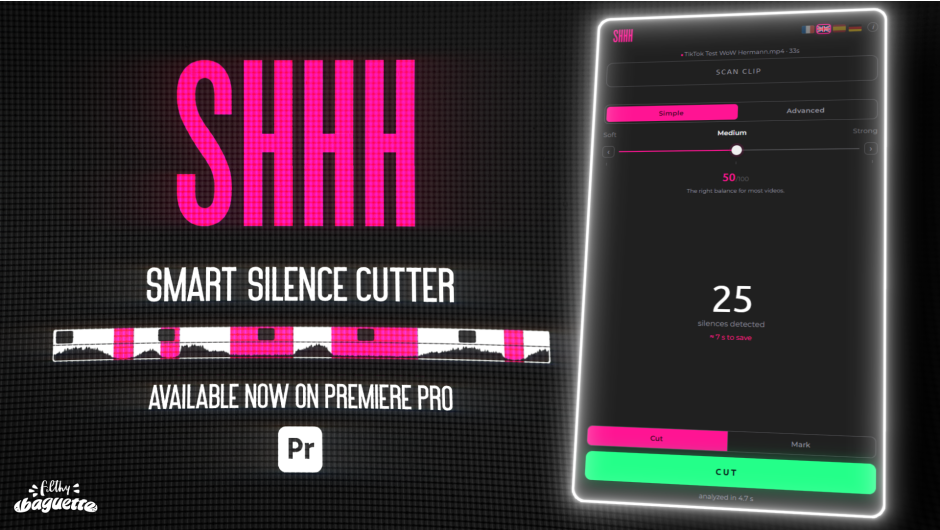
Shhh is a silence cutter plugin for Premiere Pro, it automatically detects silences from footage and removes them.
Let Shhh do the worst part of the job so you can focus on what matters.
smart silence cutter
Detects silences in your videos and removes them automatically. Save hours of editing, focus on the essential.

Analyze
Scan your timeline to find the silent parts in seconds.

Adjust
Play with simple and advanced settings to fine-tune your editing. You can even save presets.

Cut
Cut your whole footage in an instant. Thanks to a non destructive workflow, you can always go back.

Huge time saver
Remove hours of manual cutting.

Highly accurate
Detects even the shortest silences.

Non-destructive workflow
Preserve your timeline.
Go back at any time.

Made for Creators
Created with editors and content creators in mind.

smart silence cutter
Reviews
There are no reviews yet.