

Simple Collider for Blender
collider generator addon
Simple Collider for Blender – One-Click Collision Shape Generator
Versions: v1.0.1
File Size: 51 KB
Download Simple Collider for Blender on Windows, Mac, and Linux, an easy-to-use add-on that generates collision shapes for physics simulations and game engine export with a single click. Create box, sphere, capsule, convex hull, or mesh colliders from any object—perfect for game developers, VFX artists, and 3D designers.
Key Features of Simple Collider:
- One-Click Collider Generation: Create collision shapes instantly from any selected object
- Multiple Collider Types: Box, sphere, capsule, cylinder, convex hull, and mesh colliders
- Collider Preview: Visualize collision boundaries in the viewport
- Automatic Sizing: Colliders automatically fit to object dimensions
- Manual Adjustment: Fine-tune collider size and position as needed
- Rigid Body Ready: Generated colliders work with Blender’s rigid body system
- Export Compatible: Colliders export correctly to Unity and Unreal Engine
- Batch Processing: Generate colliders for multiple objects simultaneously
Perfect For:
- Game developers creating collision for game assets
- VFX artists setting up physics simulations
- Motion designers adding rigid body interactions
- Anyone needing quick collision shape generation
- Studios streamlining asset preparation workflows
System Requirements:
- Blender 3.6, 4.0, 4.1, 4.2, 4.3
- Windows 10/11 (64-bit), macOS, or Linux
- 4GB RAM minimum (8GB+ recommended)
- 5MB available disk space
Installation:
- Download the add-on zip file
- In Blender, go to Edit > Preferences > Add-ons
- Click “Install” and select the downloaded zip file
- Enable the add-on by checking the box next to “Simple Collider”
Note: Simple Collider provides quick, one-click collision shape generation for Blender, ideal for game development, physics simulations, and asset preparation. The multiple collider types and batch processing make it an essential time-saver. Designed for Blender 3.6 and above.



What is Collider Tools?
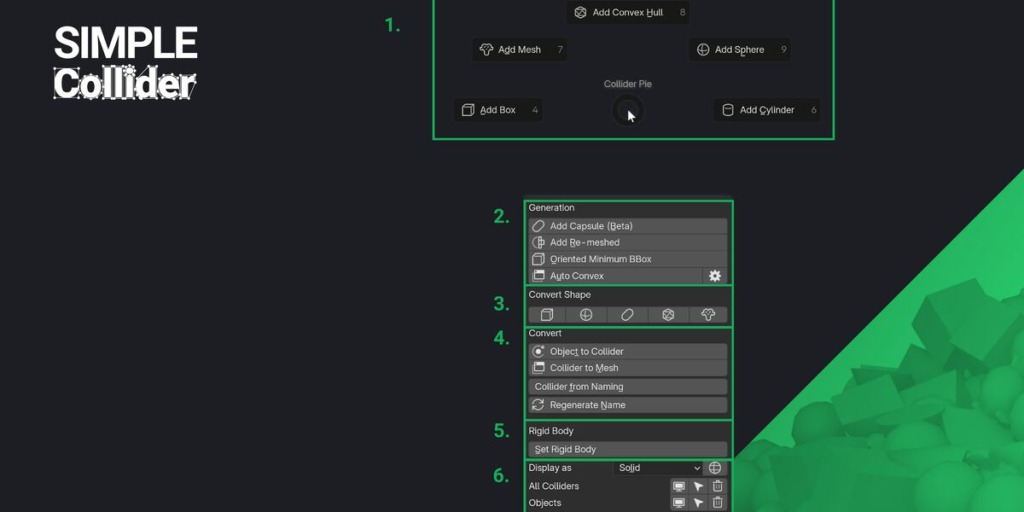
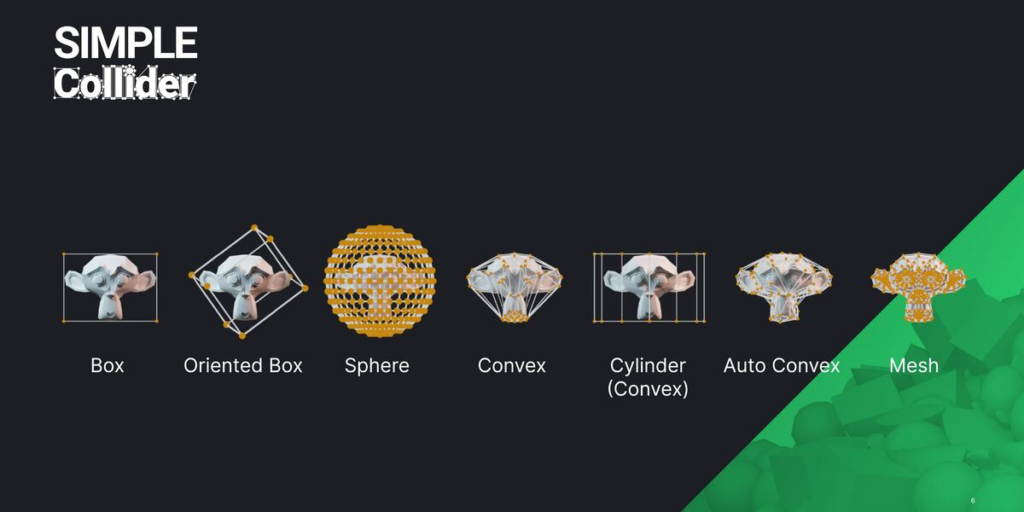
Simple Collider makes creating physics colliders for games fast and straightforward. It supports common collider types like Box, Sphere, Capsule, Convex, and Mesh as well as complex operations like Auto Convex decomposition and Oriented Bound Box generation. Simple Collider is made to work with game engines like UE, Unity, and Godot.
The addon’s simple user experience and UI lets you adjust colliders directly in the 3D Viewport, making it easy to see and control what you’re doing. You can create colliders in Object or Edit-mode, for entire selections or specific parts of a mesh. Plus, you can choose to work with pre- or post-modifier mesh data, giving you the flexibility and speed you need.
Feature Overview
- Quick and simple creation of collider objects.
- Support for Sphere, Box, Capsule, Convex, Convex Cylinder, Re-Meshed and Mesh shapes.
- Support for Oriented Minimum Bounding Box generation, an automatically oriented box collider to have the lowest volume possible.
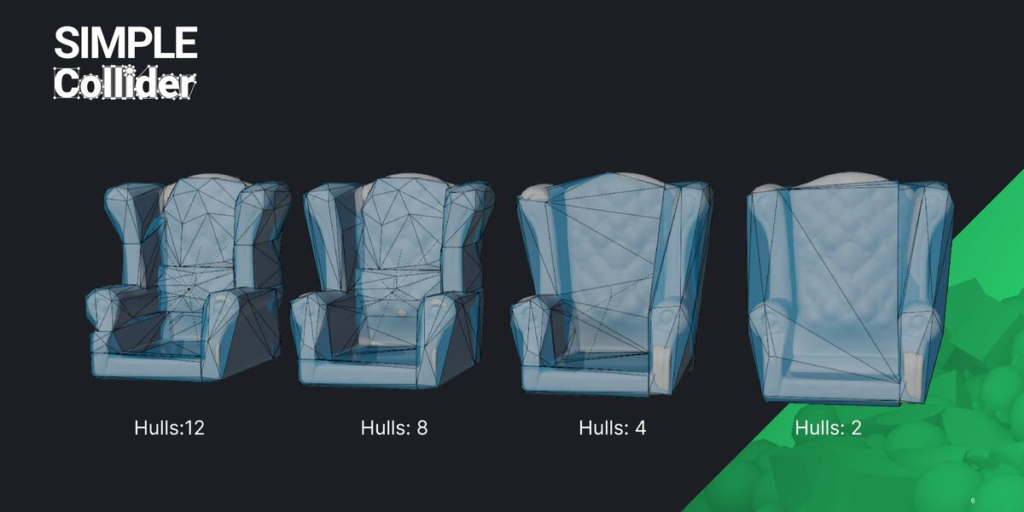
- Auto convex decomposition for complex shapes using the V-HACD library.
- Support for Object- and Edit-mode, including multi-object Edit-mode.
- Define creation space: Choose between generating colliders in Local or Global Space.
- Create colliders per individual object, around the entire selection, or based on loose parts.
- Custom colliders can be used in engines like UE4-5, Unity, Godot, and other engines with a flexible naming scheme.
- Support for Edit mode selection. Create collision only surrounding the selected geometry of each object, with multi-edit and modifier stack support.
- Support for creating world-aligned and object-aligned collisions for primitive collider types like Boxes, Cylinders, and Capsules.
- Create colliders based on pre or post-modifier stack mesh data.
- Adjust creation settings directly from the 3D Viewport, allowing for real-time user input during collider generation.
- Flexible naming options to support different engine and pipeline needs.
- Robust preset system: Select and switch between presets for different game engines, and easily exchange these presets.
- Rename colliders based on the current preset.
- Convert Mesh to Collider, Collider to Mesh, and generate colliders from a mesh name.
- Collider organization: Manage visibility, selection, and deletion using collider groups.
- Assign and organize materials for use as physics materials in engines.
Why Simple Collider?
Simple Collider removes the biggest obstacle to creating colliders in Blender—its lack of specialized tools. This addon makes the process much faster and easier, combining the speed and convenience of in-engine tools with the power and flexibility of Blender.
Here’s why Simple Collider stands out:
- More control: Create colliders in Blender with full control over shape, size and complexity – useful for all kind of assets.
- Faster compound colliders: Generate multiple colliders for one asset quickly using Object and Edit-mode selections.
- Engine compatibility: Not all engines have powerful collider tools—Simple Collider fills that gap.
- Convenience: Handle assets and colliders in one application, updating both as needed.
Supercharge your 3D creation workflow with premium selection of Blender Add-ons. Whether you are modeling intricate characters, sculpting realistic environments, or animating cinematic sequences, the right add-on can transform how you work inside Blender. Our curated collection includes powerful tools for UV unwrapping, procedural texture generation, rigging automation, rendering optimization, and more—each rigorously tested for compatibility with the latest Blender versions. Eliminate tedious manual processes and unlock advanced functionality that lets you focus on what matters most: bringing your creative vision to life. Explore our full range of professional Blender plugins today and take your 3D projects to the next level.
➡️ ➡️ For more Blender Plugins 😀 😀
Reviews
There are no reviews yet.