

Simplebake for Blender
simplebake addon
SimpleBake v3.5.7 for Blender – Intelligent Texture Baking & Material Conversion Tool
Version: V3.5.7
File Size: 5 MB
Download SimpleBake v3.5.7 for Blender on Windows, Mac, and Linux, a powerful texture baking add-on that automates the complex process of baking PBR textures, normal maps, ambient occlusion, and custom shader outputs. Perfect for game developers, asset creators, and anyone who needs to convert complex Blender materials to export-ready texture maps .
Key Features of SimpleBake v3.5.7:
- One-Click PBR Baking: Bake complete PBR texture sets—diffuse, normal, roughness, metallic, ambient occlusion, displacement
- Multi-Map Baking: Bake multiple texture types simultaneously with consistent settings
- Smart UV Handling: Automatically creates UV maps if missing, with packing options
- High-Resolution Output: Supports 1K, 2K, 4K, 8K texture resolutions
- Batch Processing: Bake multiple objects at once with identical settings
- Preset System: Save baking configurations for different asset types
- Material to Texture: Convert any node-based material to export-ready texture maps
- Performance Optimized: Efficient baking for complex materials
- Real-Time Preview: See bake previews before final output
- v3.5.7 Updates: Enhanced baking algorithms, new map types, and compatibility with Blender 4.0+
Perfect For:
- Game developers baking textures for Unity and Unreal Engine
- 3D artists preparing models for real-time rendering
- Asset creators needing export-ready texture maps
- VFX artists converting complex materials to textures
- Anyone needing professional texture baking in Blender
System Requirements:
- Blender 3.6, 4.0, 4.1, 4.2, 4.3
- Windows 10/11 (64-bit), macOS, or Linux
- 4GB RAM minimum (8GB+ recommended)
- 30MB available disk space
Installation:
- Download the add-on zip file
- In Blender, go to Edit > Preferences > Add-ons
- Click “Install” and select the downloaded zip file
- Enable the add-on by checking the box next to “SimpleBake”
Note: SimpleBake automates the complex process of texture baking in Blender, making it easy to convert node-based materials to export-ready texture maps for game engines and real-time applications . The one-click PBR baking and batch processing make it essential for game developers and asset creators . Version 3.5.7 includes full compatibility with Blender 4.0 and above . Designed for Blender 3.6 and above . Perfect for efficient texture baking . Essential for any asset export workflow .
No special nodes. No new workflow.
Just simple baking.
Introduction
Blender’s node-based material system is genuinely powerful. Building complex, layered PBR materials is well within reach. The problem comes when you need to actually get those textures out. Baking in Blender requires careful manual node setup, UV management, and a fair amount of patience. Do something slightly wrong and the results are quietly incorrect.
SimpleBake takes care of all of that. Select your objects, choose your maps, click Bake. No special node groups to add to your materials. No new workflow to learn. No limits on material complexity. It works with whatever you’ve already built.
No special nodes. No new workflow. Just baking.
SimpleBake supports PBR baking, all traditional Cycles bake modes, specialist maps (AO, Curvature, Thickness, Vertex Colours, Colour ID, Lightmap), background baking, high-to-low poly workflows, UDIM tiles, channel packing, image sequences, post-processing, and direct export to external files — all from a single panel.
See below for a full overview of the features, and also check out the FAQs and ratings for more information.
Videos
These videos from the community do a considerably better job of explaining SimpleBake than I ever could.
- In-depth tutorial covering the full workflow — 247 Creative Secrets
- Comprehensive feature overview — also explains why native Blender baking is such a pain. Brandon’s Drawings
- Feature walkthrough in an easy to follow format — POLYCOSM
- Baking PBR textures the easy way — Alex Pearce
- Baking multiple objects to a single texture atlas — Alex Pearce
- SimpleBake 2024 update — features and installation
Features
PBR Baking
Bake PBR maps directly from materials built around the Principled BSDF and Emission shaders. Multiple materials per object, multiple Principled BSDF nodes, Mix Shaders — all handled without modification to your existing setup.
- Supported map types: Diffuse, Metalness, Roughness, Glossiness, Normal (OpenGL & DirectX), Transmission, Transmission Roughness, Clearcoat, Clearcoat Roughness, Clearcoat Glossiness, Emission, Emission Strength, Specular, Alpha, Bump, Displacement, SSS, SSS Scale, SSS Colour.
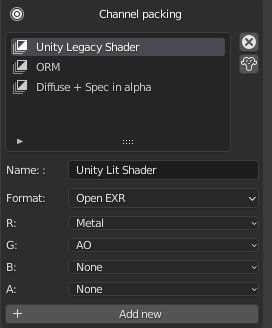
- Channel packing — Combine any baked maps into the R, G, B and A channels of a single texture. Define as many packed textures per bake as you need — ideal for ORM maps and similar game engine conventions. AOV outputs can be packed too.
- Bake to target — Bake from one or more source objects onto a single target. Ray distance, cage extrusion, and cage object are all configurable. The cage can be a custom object or auto-generated (smooth or hard).
- Auto-match high to low poly — Automatically pair high poly and low poly objects by name convention (_high / _low) or by spatial proximity. Available in both PBR and Cycles Bake modes.
- Decals — Bake PBR maps from decal objects projected onto a target mesh, automatically.
- AOV baking — Place an AOV Output node anywhere in your material and SimpleBake will bake its input — colour or value — as a separate map. Fully compatible with channel packing.
- Auto-detect required maps — SimpleBake can scan your materials and automatically select only the maps that are actually present, avoiding unnecessary bakes.
- Viewport preview — Each PBR bake type has an eye icon button next to it. Click it to temporarily apply a preview material to your objects so you can see exactly what that bake map will look like before committing to a full bake. A Restore button returns your objects to their original materials.
- Non-PBR shader conversion — Older shader nodes (Diffuse, Glossy, Emission, Subsurface, Refraction, Transparent and others) are automatically converted to Principled BSDF equivalents before baking where possible.
Cycles Baking
- All traditional Cycles bake modes — Combined, Diffuse, Roughness, Normal, Shadow, and the rest. SimpleBake handles the node setup and everything that makes native Cycles baking awkward. Multiple materials per object are no problem.
- Cycles bake to target — Selected-to-active baking in Cycles mode, including auto-match support for high-to-low poly workflows.
- Colour space control — Choose the colour space for baked images independently from whether that colour space is applied to exported files.
Special Maps
Bake any of these alongside your PBR or Cycles maps in the same operation: Ambient Occlusion, Curvature, Thickness, Colour ID, Vertex Colour, Lightmap.
- AO sample count — Configurable independently from the main bake sample count.
- Diffuse × AO multiply — Optionally multiply Ambient Occlusion into the Diffuse map at a configurable blend percentage.
- Lightmap colour management — Optionally apply colour management settings to exported Lightmap images.
- Viewport preview — AO, Curvature, Thickness, and Lightmap each have an eye icon button. Click it to preview the map directly in the viewport before baking. Once in preview mode, you can also edit the underlying material in the Shader Editor — SimpleBake will use your edited version for all subsequent bakes of that type in the file.
Workflow
- Background baking — Queue bake tasks to run in the background while you continue working in Blender. Each task can be named. Import the results whenever you’re ready.
- Image sequence baking — Bake across a frame range to produce animated texture sequences. SimpleBake advances the timeline and re-bakes each frame, with frame numbers included in output filenames.
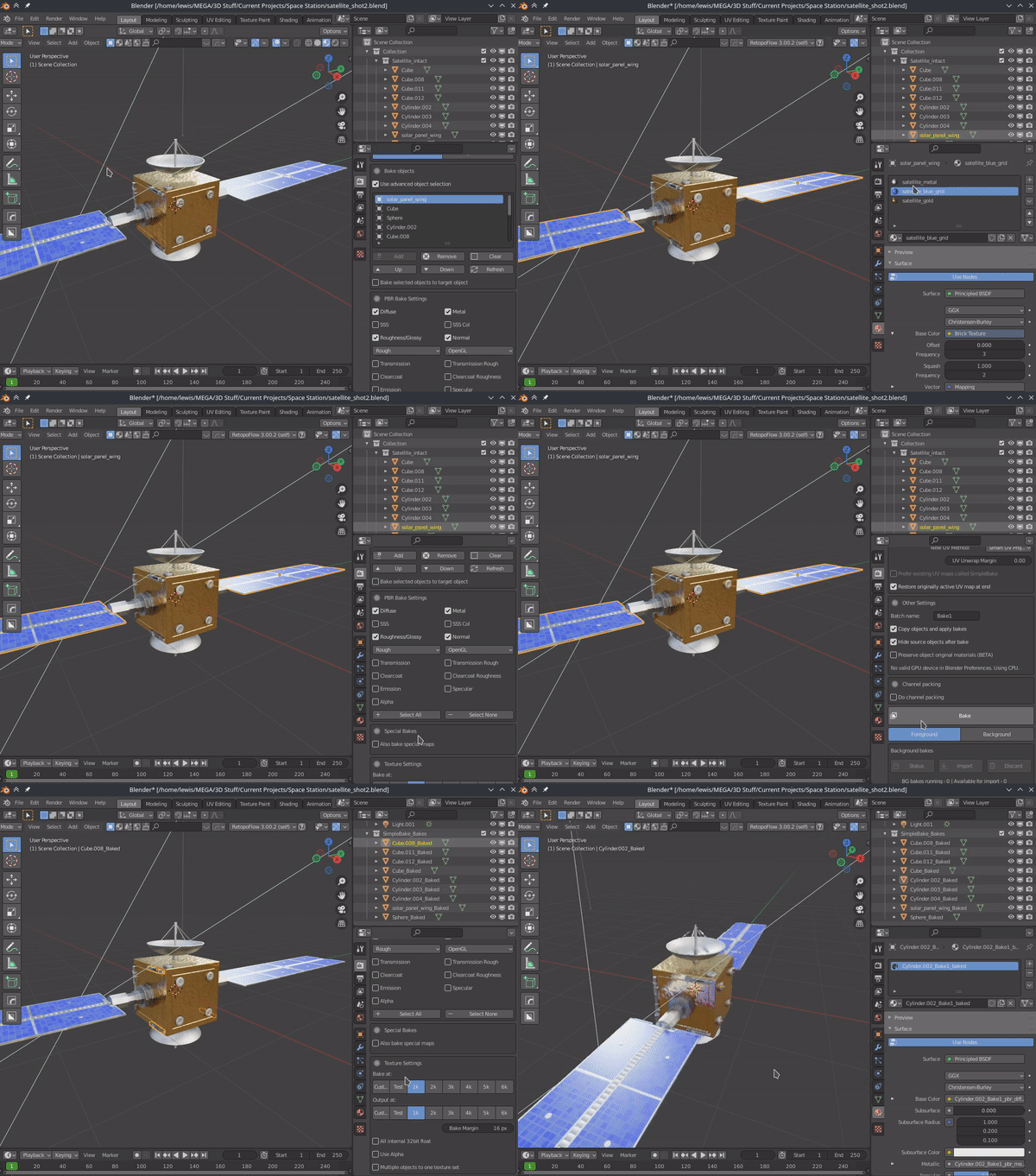
- Merged bake — Bake multiple objects to a single shared texture set. Objects can optionally be joined before baking for cleaner atlas results.
- Copy and apply bakes — Duplicate your objects and apply baked textures automatically, with a clean material set up and ready to use. Works with background baking too.
- Apply bakes to originals — Prefer not to work with duplicates? Apply baked textures directly back onto your originals instead.
- Object isolation — Optionally hide other objects during baking so they don’t contribute unwanted shadows or lighting. Lights are unaffected.
- Iterative baking — Disable “clear image before bake” to add to an existing bake rather than replacing it — useful for building up results in stages.
- Presets — Save and load bake configurations as named presets, reusable across different blend files.
UV Management
- Smart UV Project — Generate new UV maps per object or as a shared atlas. Existing UVs can also be combined into an atlas.
- UDIM support — UDIM tiles are detected and baked correctly. Objects with and without UDIM tiles can be baked together in the same operation.
- Advanced UV packing — Control rotation, scale, margin method, and island locking when creating atlas maps.
- UV map restoration — Optionally restore your original active UV map after baking, or keep the bake UVs in place.
Export
- Export baked maps — Save bakes to external files in PNG, JPEG, TIFF, or OpenEXR (with codec selection). 16-bit and 32-bit float output are supported. Normal maps are always exported at 16-bit.
- Export mesh — Export your mesh in FBX, OBJ, GLTF, or DAE format with materials pre-linked to your baked textures. Supports export presets, modifier application, and transform application.
- Batch naming and folder organisation — Assign batch names to bake operations, included in output filenames and folder structure. Bake a complex scene in stages without risk of overwriting earlier results.
- Customisable file naming — Control output filenames using a format string with variables for object name, batch name, bake type, resolution, blend file name, and frame number.
- External linking — Baked textures saved externally are linked to those files within Blender. Close and reopen your project and your bakes are still there.
- glTF settings node — Optionally create a glTF settings node group with AO or Lightmap connected, for correct handling on glTF export.
Post-processing & Output Options
- Normal map format — Switch between OpenGL and DirectX normal map formats with a single toggle. The Y-channel flip is handled automatically on export.
- Roughness / Glossiness — Output either a Roughness or Glossiness map (its inverse) depending on what your target application expects.
- Denoising — Run applicable maps through the compositor denoiser — effective for AO, Thickness, and Lightmap bakes where noise can appear.
- Anti-aliasing — Pass baked images through the compositor anti-aliasing node. Threshold, contrast limit, and corner radius are all adjustable. Normal maps are excluded.
- PBR aliases and colour space settings — Rename map types and assign colour spaces per map in preferences, for platforms with specific naming expectations such as Sketchfab.
General
- Error handling and tips — Settings are validated before baking begins, with clear explanations of what went wrong. Contextual tips in the interface help avoid common mistakes.
- Conflict detection — Known conflicting addons are flagged before baking begins, helping avoid hard-to-diagnose crashes or incorrect output.
- Texture size and bake margins — Set texture and output resolution with a single click. Bake margins are calculated and set automatically based on resolution.
- Panel location — SimpleBake can sit in the Render Properties panel or the N-Panel, depending on your preference.
Compatibility
Blender
Compatibility is guaranteed with Blender 5 and above — official releases only. Modified builds, Betas, Alphas, and Release Candidates are not supported. Support is provided for the current stable Blender release.
Other Addons
SimpleBake should work alongside any addon that creates materials based around the Principled BSDF and Emission shaders. Known working examples include Layer Painter, Mask Tools, and BPainter.
Compatibility with third-party addons is not guaranteed, but reasonable efforts are made to maintain it with popular tools. If the developers of those addons make significant changes to how they work, compatibility may break — and may or may not be fixable.

Supercharge your 3D creation workflow with premium selection of Blender Add-ons. Whether you are modeling intricate characters, sculpting realistic environments, or animating cinematic sequences, the right add-on can transform how you work inside Blender. Our curated collection includes powerful tools for UV unwrapping, procedural texture generation, rigging automation, rendering optimization, and more—each rigorously tested for compatibility with the latest Blender versions. Eliminate tedious manual processes and unlock advanced functionality that lets you focus on what matters most: bringing your creative vision to life. Explore our full range of professional Blender plugins today and take your 3D projects to the next level.
➡️ ➡️ For more Blender Plugins 😀 😀
Reviews
There are no reviews yet.