
Skin Selection Addons for Blender
skin selection addon
Skin Selection Addon for Blender – Intelligent Vertex Selection & Editing Toolkit
Download Skin Selection Addon for Blender on Windows, Mac, and Linux, a powerful selection enhancement tool designed specifically for skin and organic mesh editing. Quickly select edge loops, ring selections, boundary edges, and custom patterns on organic models—perfect for character artists, 3D sculptors, and anyone working with skin, creature, or organic meshes .
Key Features of Skin Selection Addon:
- Edge Loop Selection: Intelligent edge loop selection that follows skin and organic topology
- Ring Selection: Select edge rings across organic surfaces
- Boundary Selection: Quickly select mesh boundaries—useful for cuffs, necklines, and garment edges
- UV Island Selection: Select entire UV islands for texture adjustments
- Material Island Selection: Select all faces sharing a specific material
- Symmetry Selection: Mirror selections across symmetry axis
- Selection Memory: Save and recall complex selection sets
- Custom Shortcuts: Assign hotkeys for frequently used selection modes
Perfect For:
- Character artists selecting edge loops for weighting
- Texture painters selecting UV islands for adjustments
- Modelers selecting boundaries for extrusion
- Riggers selecting vertex groups for skinning
- Anyone needing efficient selection tools for organic meshes
System Requirements:
- Blender 3.6, 4.0, 4.1, 4.2, 4.3
- Windows 10/11 (64-bit), macOS, or Linux
- 4GB RAM minimum (8GB+ recommended)
- 5MB available disk space
Installation:
- Download the add-on zip file
- In Blender, go to Edit > Preferences > Add-ons
- Click “Install” and select the downloaded zip file
- Enable the add-on by checking the box next to “Skin Selection Addon”
Note: Skin Selection Addon provides specialized selection tools for organic and skin meshes, making edge loop selection, UV island selection, and boundary selection faster and more intuitive . Perfect for character artists, texture painters, and anyone working with organic models . Designed for Blender 3.6 and above . Essential for efficient selection workflows on organic meshes .
What is Skin Selection?
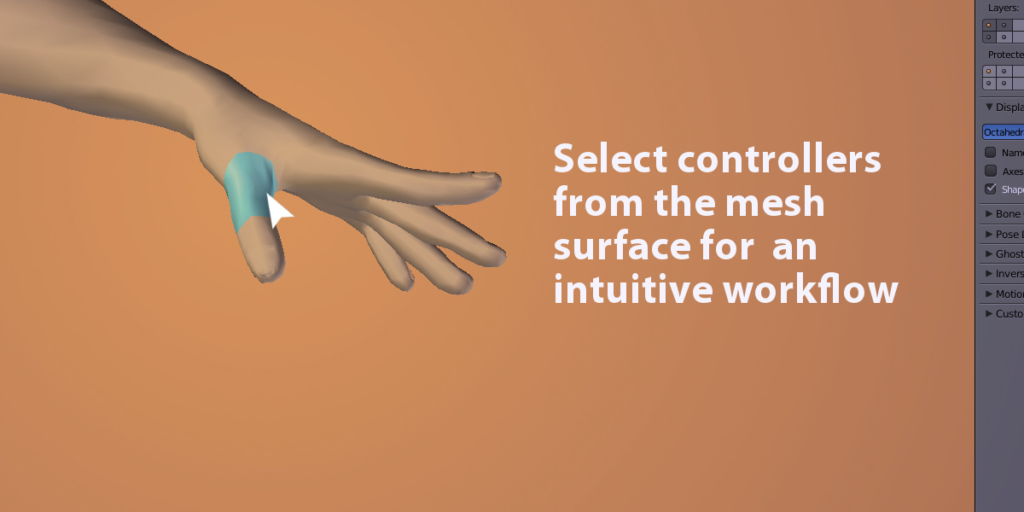
Skin Selection is a Blender addon to select bones controllers intuitively, by clicking the mesh surface.
Compatible with any rig/armature.
Check the video demo to use it: for Blender 2.8x or Blender 2.79

Important remarks/ known issues, please note that:
- Selection can be wrong in ortho mode, switch to perspective mode (numpad key 5)
- With mirror modifiers, the name of the bones controllers must end with a two characters side, eg: “hand.l” or “hand_L” for left, “hand.r” or hand_R” for right side.
- If multiple bones are included in the vertex group, they must be from the same side
- Selection highlight backface culling doesn’t work properly with Blender 2.9x versions
- Performances are generally fine for models made of ~25.000 polys. However with surface subdivision turned on, bone selection may be slower. Use Subsurf’s open subdiv feature for better performances (Blender 2.79 only for now)
Usage:
1)Create the vertex groups:
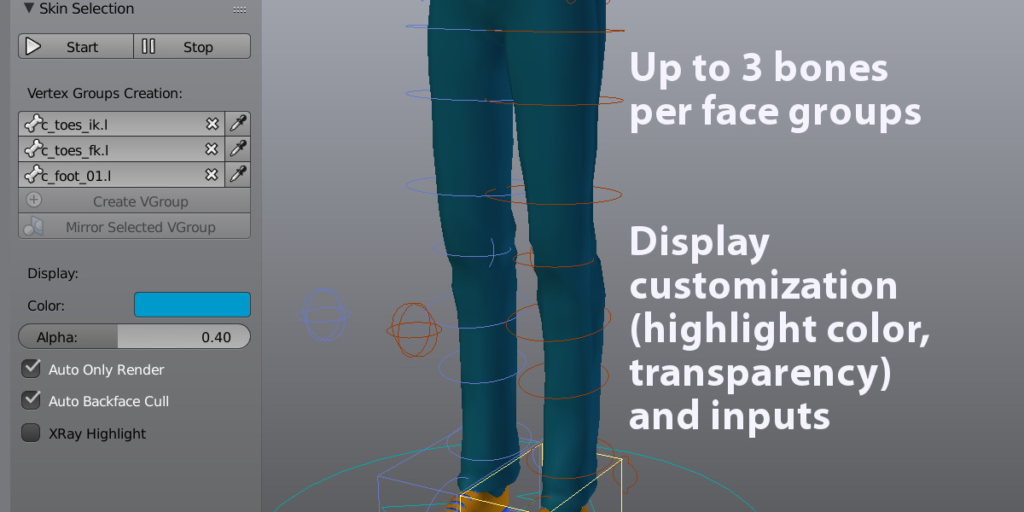
- Under the Vertex Groups Creation label, add up to three bone controllers.
- Click Create VGroup. A corresponding vertex group is added. The group are easily recognizable with the fs:” prefix for “face selection” vertex groups.
- Assign the faces/vertices for this vertex group.
- Optionally if the group is from the right or left side, click Mirror Selected VGroup to mirror it on the other side.
2)Display options:
- Optionally change the display parameter: color, alpha…
3)Click Start!
- Only the meshes will be displayed.
4)Click an area on the mesh to select the associated controller.
- Click to select the first mapped controller, hold Shift for the second, and Alt for the third.
5)Press escape key or the Stop button to go back to the normal mode.
Supercharge your 3D creation workflow with premium selection of Blender Add-ons. Whether you are modeling intricate characters, sculpting realistic environments, or animating cinematic sequences, the right add-on can transform how you work inside Blender. Our curated collection includes powerful tools for UV unwrapping, procedural texture generation, rigging automation, rendering optimization, and more—each rigorously tested for compatibility with the latest Blender versions. Eliminate tedious manual processes and unlock advanced functionality that lets you focus on what matters most: bringing your creative vision to life. Explore our full range of professional Blender plugins today and take your 3D projects to the next level.
➡️ ➡️ For more Blender Plugins 😀 😀
Reviews
There are no reviews yet.