

Split Blur v1.1.1 Script For After Effects
Split Blur v1.3.2 Plugin to Create Professional Crystal Effect in After Effects
Here’s another example of a plugin called Split Blur version 1.3.2 for After Effects. With the help of this plugin, you can create a scene blur effect professionally. You can take multiple copies of your video and order the opacity of these layers to be randomly dimmed to create a beautiful effect for the image.
Kaleidoscopic blur with an organic painterly feel.
How it works
The effect splits the image into multiple blended copies of itself. The distance of the splits is dynamically calculated according to the luminosity of each pixel and can be modulated in many ways. Split Blur looks like a regular gaussian blur on small blur levels, but gradually transforms into a unique kaleidoscopic image split with greater distances.
Available parameters rundown
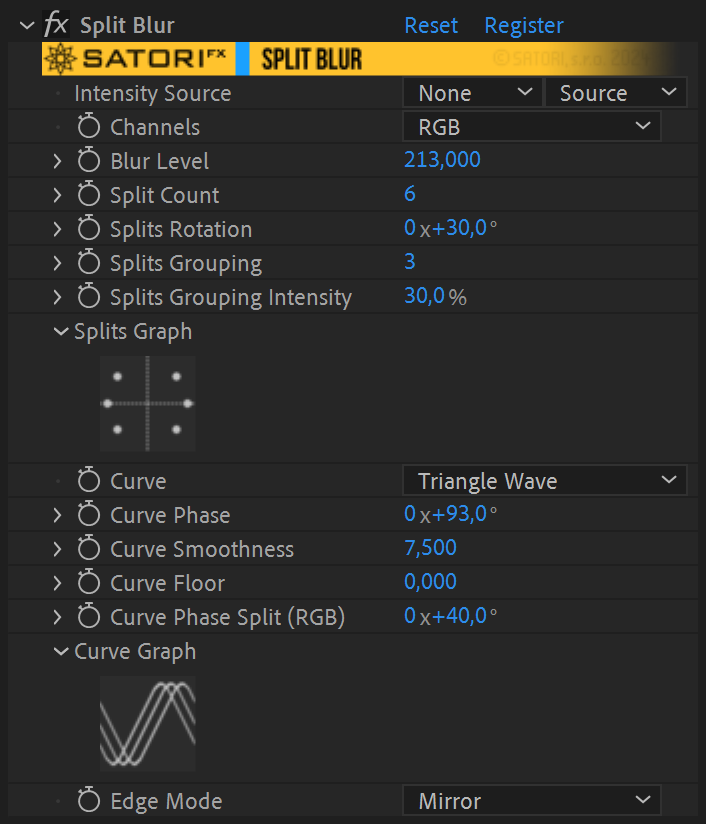
- Channels – allows you to specify which color channels should the effect be applied to.
- Luma – the effect is applied to all channels equally using the overall luminance of a pixel.
- RGB – the effect is applied on each of the RGB components separately.
- Red, Green, Blue, Alpha – affects just the selected channel.
- Intensity Source – the splitting effect is calculated using the image itself by default, but you can provide a completely different layer/track, as an input, for unconventional results. If the secondary layer has different dimensions, it’s stretched to match the primary layer.
- Blur Level – the strength of the blur effect – ie. the maximum distance of split pixels from the origin pixel.
- Split Count – how many copies the image should be split into. The splits are spaced out evenly on a circle around the original image.
- Splits Rotation – changes the angle of the splits.
- Splits Grouping – adds the ability to converge split directions into fewer groups and disrupt the even distribution around the circle. The value defines the maximum number of points belonging to one group.
- Splits Grouping Intensity – determines how much the grouping feature is applied and gradually changes evenly spaced splits into smaller numbers of groups. With a value of 100%, the points in the groups converge to one point, which is in their angular center. The number of groups derives from the number of splits in use and the size of the groups defined by the Splits Grouping parameter.
- Splits Graph – is visual representation of split configuration to help you understand how Split Count, Splits Rotation, and grouping parameters work.
- Curve – specifies how the pixel luminosity is mapped to blur distance. (details in the manual)
- Curve Phase – offsets the curve by a set amount of degrees. (details in the manual)
- Curve Smoothness – helpful for smoothly connecting the beginning and the end of discontinuous curves (linear ramps and exponentials) or smoothing out a triangular curve.
- Curve Floor – defines the minimum split distance.
- Curve Phase Split (RGB) – can be used when filtering RGB channels for an extra colorizing effect by utilizing an additional shift of curve phase for R and B channels.
- Curve Graph – visualizes the curve mapping for your convenience.
- Edge Mode – when the image is offset by the effect a number of pixels on the edges will always be missing, this specifies how they’re filled in.
- Wrap – wraps around the image.
- Mirror – mirrors the edge pixels.
- Repeat Last – repeats the last edge pixel.
- Transparent – leaves the missing pixels empty.
| PLATFORMS | |
| Microsoft Windows | ✓ |
| macOS Intel | ✓ |
| macOS Apple Silicon | ✓ |
| APPLICATIONS | VERSIONS | |
| After Effects | ✓ | CS6 – 2024 |
| Premiere Pro | ✓ | CS6 – 2024 |
| FEATURES | |
| Max. Rendering Resolution | no limit |
| Multi-Frame Rendering | ✓ |
| Utilizing GPU | ✗ |
After effects templates
Amazing clips to use and help you create your own unique projects from AE templates or to improve the design of your existing broadcasts.
We have a wide range of templates for you to choose from. You can find PowerPoint Video Templates, Motion Graphics Templates, and After Effects Logo Templates, Scripts, Promos, news, fashion, sports, social media, titles…
After Effects Templates, Wedding Templates as well, After Effects Intro Templates, Transitions, Products Promos, Instagram stories, Scripts, Call Titles, Elements 3D, Corporate , and many more.
With After Effects project files, or templates, your work with motion graphics and visual effects will get a lot easier. In short, they are customizable After Effect files, neatly organized and labelled. You can easily change colors, text and other design elements without having to spend time on creating timelines and effects. It’s all there-you just need to customize it to fit your project.
What you waiting for? Hurry up and download the best after effects templates
➡️ ➡️ For more Ready Project Files Templates 😀 😀
➡️ ➡️ For more after effects plugins 😀 😀
Reviews
There are no reviews yet.