
SplitStudio for After Effects
SplitStudio v1.0.0 for After Effects
The Ultimate Multi-Panel Layout and Composition Splitter Tool
Download SplitStudio v1.0.0 today. Consequently, you can instantly divide your After Effects compositions into dynamic, multi-panel grids for side-by-side comparisons, video walls, and stylized layouts. Because modern social media content and broadcast graphics frequently require complex split-screen presentations, having a dedicated layout tool is absolutely essential.
Nevertheless, manually masking and aligning multiple layers to create perfect grids takes hours of frustrating precision work. Fortunately, SplitStudio eliminates this bottleneck completely. Moreover, it provides a fully procedural system to generate perfectly spaced, customizable panels in seconds. In short, you can create complex multi-screen layouts with unprecedented speed.
Procedural Multi-Panel Generation
The core of this extension lies in its ability to generate structured layouts procedurally. For instance, you can instantly divide your canvas into horizontal, vertical, or grid-based sections. Furthermore, you can customize the number of rows and columns with a single click.
Additionally, the tool automatically applies precise masking and positioning to every layer you place inside. Since the layout is completely parametric, you can adjust the gutter spacing and panel dimensions at any time. Consequently, your designs remain perfectly aligned and highly flexible.
Dynamic Content Routing and Alignment
Professional workflows demand efficient content management. Therefore, SplitStudio includes intelligent layer routing features. For example, you can automatically distribute selected layers evenly across all generated panels.
Furthermore, the tool perfectly centers each layer within its designated frame. Additionally, it supports seamless swapping of content between panels without breaking the grid. Since the alignment is handled automatically, you avoid manually resizing footage to fit different aspect ratios. Thus, you can build complex video walls effortlessly.
Customization and Visual Styling
Creative exploration requires granular control over the final aesthetic. Accordingly, SplitStudio provides a comprehensive suite of styling options. For instance, you can adjust the corner radius of each panel for a modern, rounded look.
Furthermore, you can apply custom borders, strokes, and drop shadows to separate the sections. Additionally, the tool allows you to animate the entrance and exit of the grid dynamically. Since every parameter is fully keyframable, you can create energetic, moving layouts. Consequently, your motion graphics will stand out with premium visual polish.
Perfect for Social Media and Broadcast Designers
This extension is particularly well-suited for social media creators producing viral split-screen videos. Similarly, broadcast designers will appreciate the ability to quickly generate multi-box news layouts and sports panels. Additionally, sports analysts and podcasters can use the tool to display multiple camera angles simultaneously. Ultimately, SplitStudio v1.0.0 accelerates your entire post-production pipeline.
System Requirements and Compatibility
SplitStudio v1.0.0 supports After Effects versions 2022, 2023, 2024, 2025, and 2026. It works on both Windows and macOS operating systems. The extension is available as a standard CEP or JSX panel for easy installation. You will need a standard workstation with at least 8GB of RAM.
Installation and Usage Guide
To install, first download the extension files from your library. Next, close Adobe After Effects if it is running. Then, copy the extension folder to your CEP extensions directory or Scripts folder. After that, ensure “Allow Scripts to Write Files and Access Network” is enabled in After Effects Preferences under Edit > Scripting & Expressions.
Finally, launch After Effects and navigate to Window > SplitStudio. Choose your grid dimensions and click to generate. Thus, your multi-panel layout workflow will be ready instantly.
What is Included Inside?
The pack contains the complete SplitStudio v1.0.0 extension for After Effects. Furthermore, it includes the procedural multi-panel generation engine and dynamic content routing features. Additionally, you receive comprehensive visual styling controls and full animation support. Ultimately, you receive everything needed for professional split-screen layouts.
Final Thoughts on the Extension
Effortless layout generation evokes profound creative freedom. Therefore, this extension provides the ultimate foundation for your multi-screen workflows. You can divide and arrange compositions with unprecedented speed and precision. Consequently, your creative vision becomes a stunning reality.
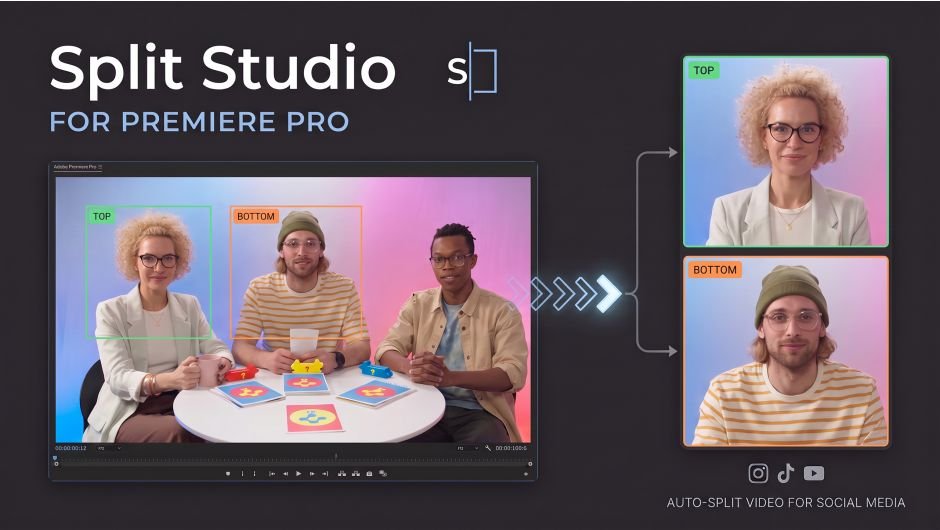
A Premiere Pro and Aftereffects panel for building split-screen edits without hand-nesting clips or setting Motion on every layer, one by one.
Crop · Compose · Apply
Stop Nesting Split-Screens
By Hand
Every Reaction. Every Grid.
Crop footage on the left. Place cells on the right. Hit Apply — Premiere builds the nested sequence with Motion already set. No hand-built nests. No clip-by-clip tweaking.
Split Studio · Premiere Pro CEP Panel
Two Viewers.
One Button.
Reaction, podcast, gameplay + facecam, before/after, and multi-cam grids — designed on live footage, then built as a real nested sequence.
How It Works
Left Crops. Right Composes.
Apply Builds The Sequence.
The crop and the cell are decoupled — resizing one never resizes the other.
LEFT
Source Viewer
Crop windows on your real sequence footage. Each mask is a window on the frame — not a placeholder.
RIGHT
Output Viewer
Place cells in 9:16, 1:1, 4:5, or 16:9. Fit, Fill, Stretch, scale, rotate, and flip — preview matches Apply.
BOTTOM
Timeline
One playhead drives both viewers. Hold keyframes where the layout changes, or scan for cuts and key those points.
APPLY
New Nested Sequence
Premiere builds the nests, Motion values, and optional background. Your original timeline stays untouched.
01 · TEMPLATES
Load A Split Template
Drop in a preset, then reuse a saved layout on the next project — geometry already placed.
02 · DRAW & SAVE
Draw A Split. Save It.
Drag a custom cell on the output, then save the geometry — or export .splitpro.json.
03 · TIMELINE
Keyframes On The Timeline
Hold cuts, not tweens. Park, change the layout, Apply — Premiere concatenates each segment with frame-tight joins.
04 · CUT DETECT
Find Cuts Automatically
Scan editorial joins and in-clip scene changes, then turn those hits into layout keys in one step.
The Difference
Without vs With
The same nest-then-Motion loop — until Split Studio.
Without Split Studio
✕Nest each clip into its own sequence
✕Drop nests onto the master timeline
✕Hand-set Scale and Position on every layer
✕Open Effect Controls for each clip
✕Redo everything when the layout changes
With Split Studio
✓Crop the source on the left
✓Place cells on the right
✓Motion values written automatically
✓Hit Apply to Sequence
✓Save the layout as a reusable template
$59.99$39.99
Layout Gallery
Fourteen Presets.
Then Make It Yours.
Start from a social layout — then crop, draw extra cells, and save your own templates.
Reaction
Content + reaction stack
Gameplay + Facecam
Main play + overlay cam
Podcast
Background + Host 1 + Host 2
Picture in Picture
Full main + overlay cell
Before / After
Side-by-side comparison
Dual PiP
Main + Cam A + Cam B
Split Top / Bottom · Left / Right
Classic two-cell frames
Triple · Four Grid · Side Stack
Columns, 2×2, and stacked cells
Who It’s For
Reels. Reactions.
Podcasts. Gameplay.
If you currently nest split-screens by hand in Premiere, this is the panel that replaces that loop.
Shorts & Reels
9:16, 1:1, and 4:5 from the output bar — same crop-and-place workflow.
Reaction & facecam
Content up top, reaction below — or gameplay with a cam overlay.
Podcasts & grids
Hosts, 2×2 grids, triple columns — plus Draw for custom cells.
Preview matches Apply. Framing uses Scale and Position — Premiere’s Motion Crop is never used, so nested sequences stay framed correctly.
Learn More
Full Tutorial
A complete walkthrough: crop, compose, keyframes, cut detect, Apply to Sequence, templates, and more.
Elevate your motion graphics workflow with premium collection of After Effects plugins. Whether you are a seasoned professional or just starting your VFX journey, powerful tools designed to streamline complex tasks, unlock creative possibilities, and save you hours of rendering time. From stunning glitch effects and seamless transitions to advanced 3D extrusion and text animation tools, each plugin in our library is rigorously tested for compatibility with the latest versions of Adobe after Effects. Enhance your video production value today and download industry-leading plugins that help you create breathtaking visuals without the technical headaches. Browse our full range and find the perfect extension to supercharge your editing suite now.
➡️ ➡️ For more after effects Plugins 😀 😀
➡️ ➡️ System requirements AE
Reviews
There are no reviews yet.