
Squish for Blender
Squish v1.1 for Blender
The Ultimate Three-Click Rig Deformation Fix Tool
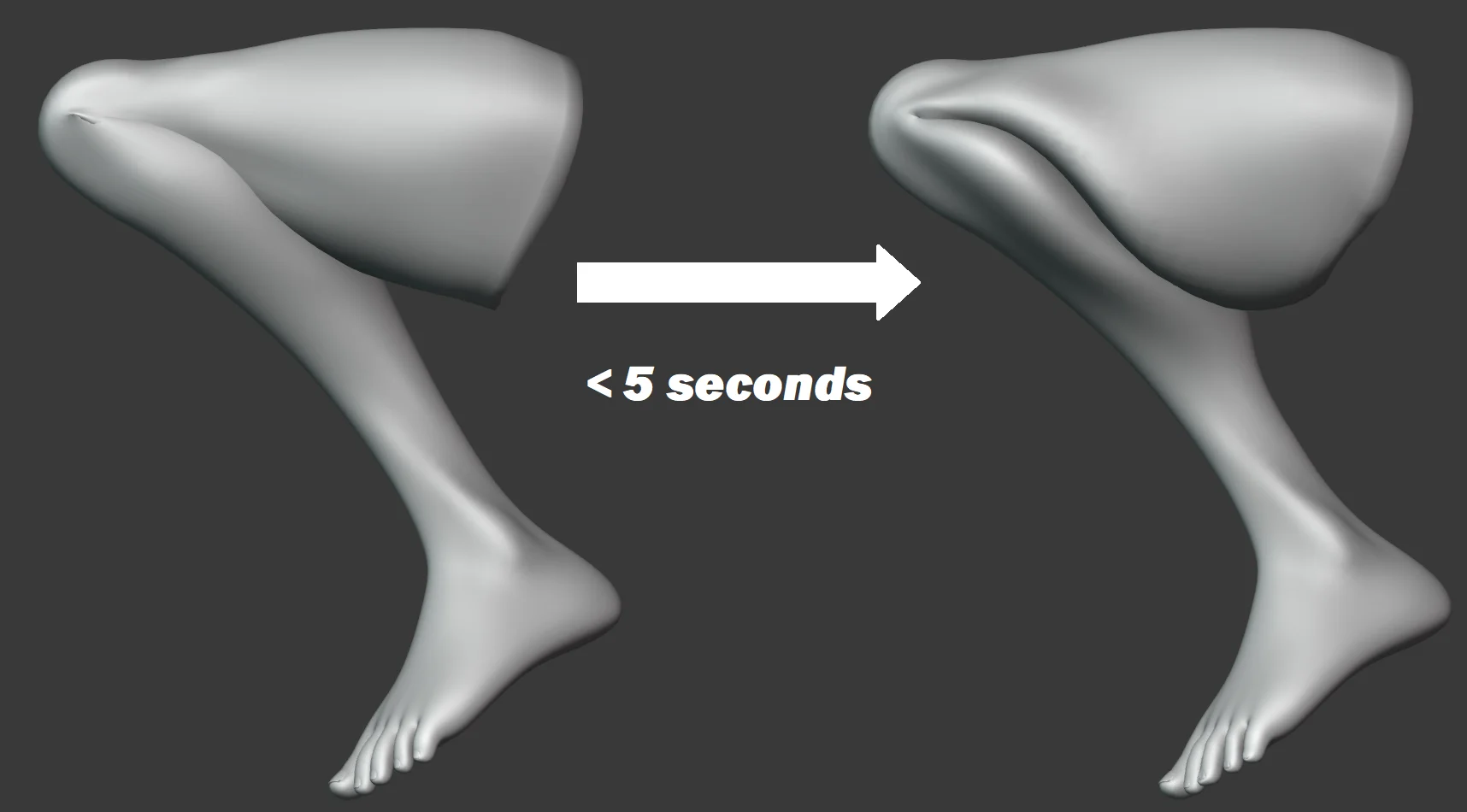
Download Squish v1.1 today. Consequently, you can correct ugly deformations in your character rigs with just three clicks—no Shapekeys, no drivers, and no hours of tedious weight painting required . Because professional character animation demands clean, predictable deformations, having access to an efficient correction tool is absolutely essential. Nevertheless, fixing problematic joint deformations traditionally consumes countless hours of manual weight painting and corrective shape creation. Fortunately, Squish eliminates this frustration entirely . Moreover, it leverages Blender’s powerful Geometry Nodes system to deliver instant, high-quality deformation corrections . In short, you can achieve professional-grade rig deformations in a fraction of the usual time.
Instant Geometry Nodes-Based Correction System
The core of this addon lies in its elegant, modifier-based approach. For instance, you simply add the Squish modifier to your rigged mesh and watch the deformations correct themselves almost instantaneously . Furthermore, the system works by intelligently adjusting mesh volumes during articulation, preventing the unwanted collapsing and stretching that commonly plagues character rigs . Since the entire process operates through Geometry Nodes, the results remain fully procedural and non-destructive . Consequently, you can iterate and refine your rig without committing to permanent changes.
Advanced Control Options in Version 1.1
Version 1.1 introduces several significant enhancements that give you greater control over the correction process . For example, you can now use vertex groups to control the spread of the deformation effect, target specific areas with greater precision, and even use object colliders to influence the correction behavior . Additionally, the Spread parameter has been upgraded from an integer to a float value, allowing for finer adjustments . The update also includes a built-in corrective smooth function, lowers the minimum possible spread value, and completely fixes random geometry popping issues . Thus, you can fine-tune the correction to match your specific rig and animation requirements.
Flexible Workflow and Asset Integration
The tool supports versatile workflow options that integrate seamlessly into your existing pipeline. For instance, you can use collections to organize and manage multiple objects simultaneously, and you can mark the node group as an asset for easy reuse across projects . Furthermore, the update renames subgroups with more descriptive names and removes unnecessary attribute smoothing for improved performance . The node group also includes a free demo model, allowing you to test and understand the system before applying it to your own characters . Ultimately, Squish v1.1 delivers both power and simplicity.
Perfect for Character Animators and Technical Artists
This addon is particularly well-suited for character animators who need to quickly fix deformation issues in production rigs. Similarly, technical artists and riggers will appreciate the ability to apply corrections without modifying the underlying rig structure . Additionally, anyone working with character animation will benefit from the significant time savings and improved visual quality . Ultimately, Squish accelerates your entire character animation and rigging pipeline.
System Requirements and Compatibility
Squish v1.1 requires Blender 3.1 or newer . Furthermore, the addon is delivered as a .blend file containing the Geometry Nodes node group, which you append to your project . It works across all major operating systems that support Blender. You will need a standard workstation with at least 8GB of RAM, though requirements are minimal given the tool’s efficient design.
Installation and Usage Guide
To install, first download the .blend file from your library. Next, open your Blender project and navigate to File > Append . Then, navigate to the downloaded .blend file and select the NodeTree containing the Squish modifier . After that, append it to your project. Finally, select your rigged mesh, add a Geometry Nodes modifier, and assign the Squish node group. Adjust the spread and other parameters as needed . Thus, your professional deformation correction workflow will be ready instantly.
What is Included Inside?
The pack contains the complete Squish v1.1 Geometry Nodes node group . Furthermore, it includes a basic user manual to help you get started quickly . Additionally, you receive a free demo model for testing purposes . Ultimately, you receive everything needed for professional rig deformation correction.
Final Thoughts on the Addon
Effortless three-click deformation correction evokes profound creative freedom. Therefore, this addon provides the ultimate foundation for your character animation workflows. You can achieve clean, professional rig deformations with unprecedented speed and simplicity. Consequently, your animation vision becomes a stunning reality.
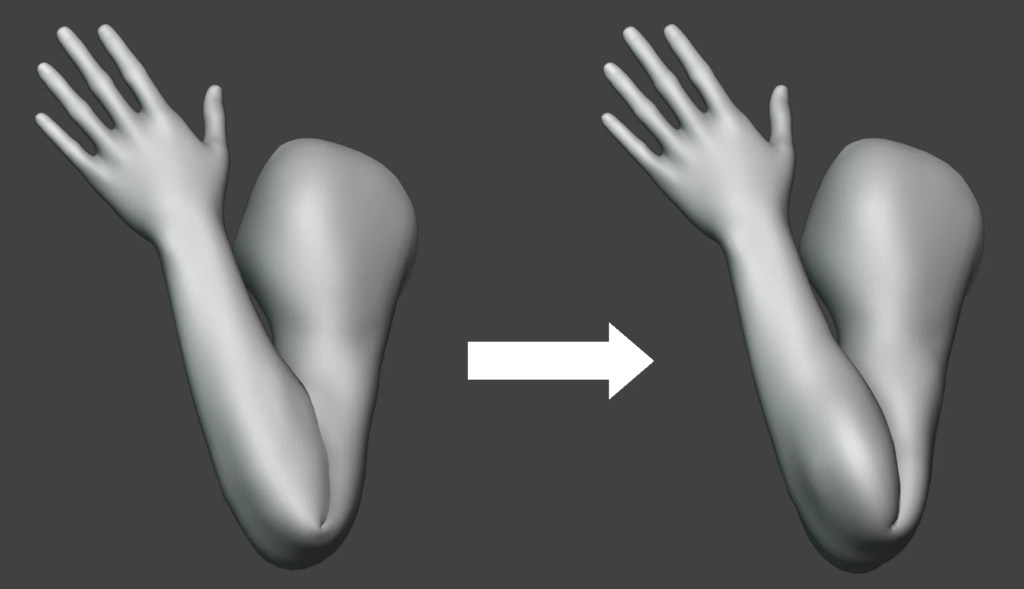
What if you could correct ugly deformations in your rigs in just three clicks? Seriously, no Shapekeys, no drivers, no hours upon hours of weight painting, no hair pulling. Just add a modifier and BOOM! instant high-quality rig.
Yes, this is possible. Using Blender’s Geometry nodes this node group saves your hours and your scalp.
Download the blend file and append the NodeTree into your own file. You can also mark the node group as an asset.
Supercharge your 3D creation workflow with premium selection of Blender Add-ons. Whether you are modeling intricate characters, sculpting realistic environments, or animating cinematic sequences, the right add-on can transform how you work inside Blender. Our curated collection includes powerful tools for UV unwrapping, procedural texture generation, rigging automation, rendering optimization, and more—each rigorously tested for compatibility with the latest Blender versions. Eliminate tedious manual processes and unlock advanced functionality that lets you focus on what matters most: bringing your creative vision to life. Explore our full range of professional Blender plugins today and take your 3D projects to the next level.
➡️ ➡️ For more Blender Plugins 😀 😀
Reviews
There are no reviews yet.