
SRT Subtitle Importer Exporter for Blender
SRT Subtitle Importer Exporter v1.0.4 for Blender
The Ultimate Subtitle Management and Video Editing Workflow Tool
Download the SRT Subtitle Importer Exporter v1.0.4 addon today. Consequently, you can import and export SRT subtitle files directly within Blender’s Video Sequence Editor (VSE) with remarkable ease . Because video editing and post-production workflows frequently demand precise subtitle management, having access to a dedicated tool is absolutely essential. Nevertheless, handling subtitles in Blender traditionally involved external applications and tedious manual synchronization. Fortunately, this addon eliminates that friction completely . Moreover, it bridges the gap between your VSE text strips and industry-standard SubRip subtitle files . In short, you can manage, edit, and export subtitles entirely within Blender without ever leaving your editing environment.
Bidirectional SRT Import and Export System
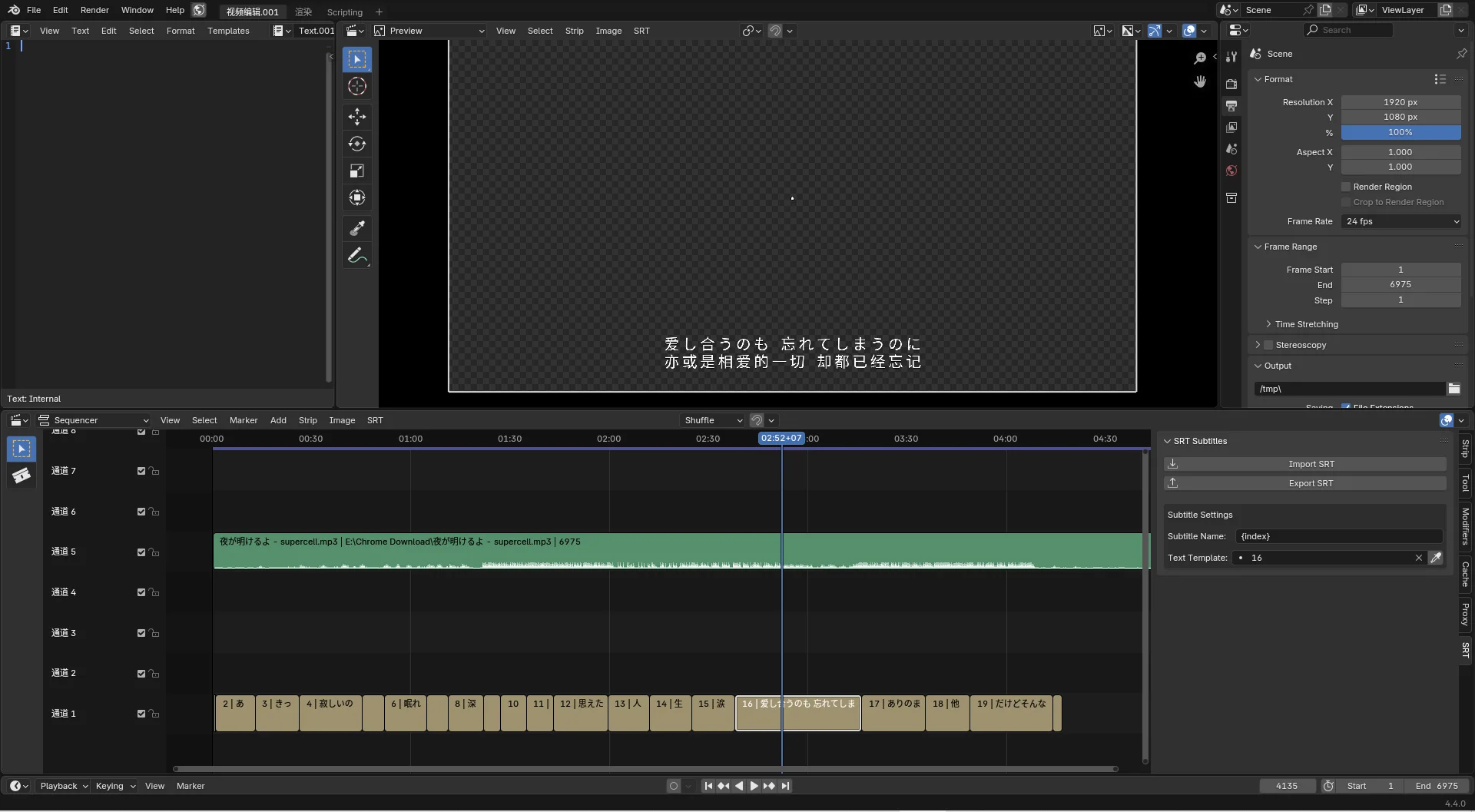
The core of this addon lies in its seamless integration with the VSE timeline. For instance, you can import an existing SRT file, and the addon automatically generates text strips at the correct frames, positioning them precisely on the VSE playhead . Furthermore, when your project is complete, you can export all your text strips to a standard .srt file with a single click . Since the addon handles all the timecode calculations automatically, your subtitles will remain perfectly synchronized with your video . Consequently, you can work with subtitles as naturally as any other video element.
Intelligent Overlap Detection and Error Handling
Professional subtitle workflows demand robust error prevention and correction. Therefore, version 1.0.4 includes several critical improvements that ensure a smooth experience . For example, the addon now automatically detects overlapping subtitle strips during export and locates the playhead at the exact point where the overlap occurs, allowing you to fix issues immediately . Additionally, the export function now handles edge cases gracefully: if a subtitle has a duration of zero or a negative value, the system corrects it to prevent broken text strips . Thus, you can export with confidence, knowing the addon will catch and resolve common errors automatically.
Flexible Frame Alignment and Project Settings
Consistency between your timeline settings and subtitle timing is crucial for professional results. Therefore, the addon respects your scene’s frame start setting, ensuring that exported subtitles align correctly regardless of your project’s start frame . This improvement, introduced in version 1.0.3, eliminates the previous hardcoded start frame of “1” that caused misalignment in non-standard projects . Consequently, your subtitle exports will remain accurate across different project configurations and timelines.
Perfect for Video Editors and Content Creators
This addon is particularly well-suited for video editors, content creators, and localization professionals who need to add, edit, or export subtitles for their projects. Similarly, anyone creating educational content, video essays, or multilingual media will benefit from the streamlined subtitle workflow. Additionally, those managing translations or working with subtitle files from other applications will find the SRT import/export capabilities invaluable. Ultimately, the SRT Subtitle Importer Exporter accelerates your entire video editing and post-production pipeline.
System Requirements and Compatibility
The addon requires Blender 4.2 or higher . Furthermore, it is compatible with all major operating systems including Windows, macOS, and Linux. You will need a standard workstation with at least 8GB of RAM, though system requirements are minimal given the addon’s lightweight nature.
Installation and Usage Guide
To install, first download the zip file from your library. Next, open Blender and navigate to Edit > Preferences > Add-ons. Then, click the arrow in the top right corner and select “Install from Disk.” After that, locate and select the downloaded zip file, then enable the SRT Subtitle Importer Exporter . Finally, access the addon from the VSE sidebar or menus, choose your import or export action, and select your SRT file or text strips. Thus, your professional subtitle workflow will be ready instantly.
What is Included Inside?
The pack contains the complete SRT Subtitle Importer Exporter v1.0.4 addon . Furthermore, it includes both import and export functionality, overlap detection, and error handling improvements . Additionally, you receive full integration with the VSE text strip system . Ultimately, you receive everything needed for professional subtitle management.
Final Thoughts on the Addon
Effortless subtitle import and export evokes profound creative freedom. Therefore, this addon provides the ultimate foundation for your video editing workflows. You can manage subtitles directly within Blender with unprecedented ease and accuracy. Consequently, your video production vision becomes a stunning reality.
SRT Subtitle Importer/Exporter for Blender 4.2.0+
(Yes, this plugins support Blender 4.2.0+, Blender 5.0.0+)
(The compatibility shown is inaccurate)
Features
SRT Import
- VSE – Menu – SRT – Import
SRT Export
- VSE – Menu – SRT – Export
Tips
- Edit multiple text strip at a time (Blender built-in feature)
- Select multiple text strips
- Type the property in sidebar (such as font size [15])
- Hit [Alt] + [Enter]
- Edit multiple text strip at a time (Blender built-in feature)
- Select multiple text strips
- Hold [Alt] and Change the property in sidebar with [left kick], and drag the mouse to adjust the value (such as font size)
Supercharge your 3D creation workflow with premium selection of Blender Add-ons. Whether you are modeling intricate characters, sculpting realistic environments, or animating cinematic sequences, the right add-on can transform how you work inside Blender. Our curated collection includes powerful tools for UV unwrapping, procedural texture generation, rigging automation, rendering optimization, and more—each rigorously tested for compatibility with the latest Blender versions. Eliminate tedious manual processes and unlock advanced functionality that lets you focus on what matters most: bringing your creative vision to life. Explore our full range of professional Blender plugins today and take your 3D projects to the next level.
➡️ ➡️ For more Blender Plugins 😀 😀
Reviews
There are no reviews yet.