

stylized hair pro for Blender
Stylized Hair PRO for Blender
The Ultimate Geometry Nodes-Based Hair Creation and Editing Tool
Download Stylized Hair PRO today. Consequently, you can create production-ready stylized hairstyles through a streamlined, procedural workflow that automates the most complex and time-consuming aspects of hair design . Because stylized character creation demands efficient, high-quality hair tools, having access to a specialized solution is absolutely essential. Nevertheless, manually modeling and shaping stylized hair using traditional methods often consumes countless hours of trial and error . Fortunately, Stylized Hair PRO eliminates this frustration entirely . Moreover, this powerful Geometry Nodes-based addon focuses on Blender’s native Hair Curves system while also adapting seamlessly to Bézier and path curves for more traditional workflows . In short, you can craft everything from elegant flowing locks to complex braids with unprecedented speed and creative freedom.
Comprehensive Toolset for Total Creative Control
The core of this addon lies in its extensive and ever-expanding toolkit. For instance, you gain precise control over every aspect of your hair curves, including their shape, geometry, materials, and ornaments . Furthermore, the addon allows you to animate your hair creations with a built-in Hair Dynamics system, bringing static styles to life with natural movement and wind effects . Since the entire process is procedural, you can iterate and refine your hairstyles non-destructively at any stage. Consequently, your characters will feature stunning, dynamic hair that enhances their personality and visual appeal.
Advanced Features for Professional Results
Stylized Hair PRO is packed with sophisticated features that set it apart from simpler tools. For example, the Split Tip function allows you to create beautifully textured, branching hair ends, with the option to limit the effect specifically to the tips . Additionally, you can generate intricate braids with independent control over the thickness and flatness of each strand . The addon also includes dedicated Gizmo controls for intuitive, visual adjustments to parameters such as curls, braid shape, and strand resolution . Furthermore, a robust preset system enables quick application of complex styles to all selected strands, significantly speeding up your workflow . Among the community, Stylized Hair PRO is considered the most innovative stylized hair plugin available, consistently praised for features like Split Tip that are found in no other tool .
Smart Workflow and Performance Optimization
Professional pipelines demand efficient and responsive tools. Therefore, the developer has introduced crucial performance-enhancing features in recent updates. For instance, the Optimize Modifier function can dynamically select, deselect, and collapse SHP modifiers based on context, greatly improving performance in Blender 4.5 and above . Additionally, the Bake Hair Geometry feature allows you to bake the final hair geometry, significantly boosting animation playback performance while still allowing you to maintain your grooming and dynamic adjustments . These optimizations ensure that you can work on complex hair designs without sacrificing viewport speed.
Seamless Integration and Compatibility
The addon is built to work smoothly with the latest Blender technologies. Specifically, Stylized Hair PRO v4.3.1 is fully updated for Blender 5.2, while version v4.2.1 is optimized for Blender 5.1 . It is also available as a standard ZIP file for easy installation through Blender’s Preferences panel . Furthermore, it now includes support for DeanTools, an external ecosystem that extends its functionality even further . For collaborative environments, the developer maintains an active Discord group for support, updates, and community help .
Perfect for Character Artists and Animators
This addon is particularly well-suited for character artists and 3D modelers who want to speed up their stylized character workflow . Similarly, animators will appreciate the ability to create dynamic, physics-driven hair for their projects. Additionally, game developers can leverage the powerful tools to create optimized, production-ready hair assets. Ultimately, Stylized Hair PRO accelerates your entire character creation and animation pipeline.
System Requirements and Compatibility
The addon requires Blender 4.5 or above for the latest features, with specific versions optimized for Blender 5.1 and 5.2 . It works across all major operating systems that support Blender, including Windows, macOS, and Linux. You will need a standard workstation with at least 8GB of RAM, though more complex hair setups may benefit from additional memory and a capable GPU .
Installation and Usage Guide
To install, first download the ZIP file from your library. Next, open Blender and navigate to Edit Preferences. Then, select Add-ons and click Install. After that, locate and select the downloaded ZIP file, then enable Stylized Hair PRO . Finally, use the intuitive control panel in the sidebar, or the included tutorial mode, to begin creating and editing your stylized hairstyles . Access the Gizmos for precise visual adjustments, and explore the dynamic hair system to bring your creations to life . Thus, your professional hair creation workflow will be ready instantly.
Final Thoughts on the Addon
Effortless procedural hair creation evokes profound creative freedom. Therefore, this addon provides the ultimate foundation for your stylized character workflows. You can craft stunning, production-ready hairstyles with an unmatched balance of power and ease of use. Consequently, your hair design vision becomes a stunning reality.
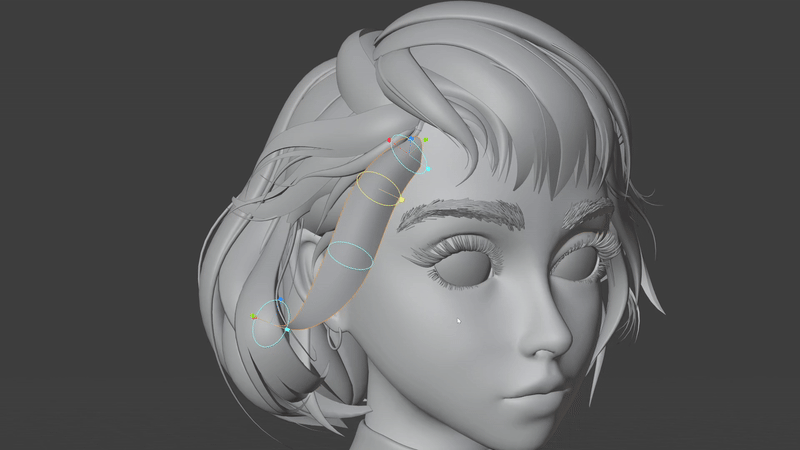
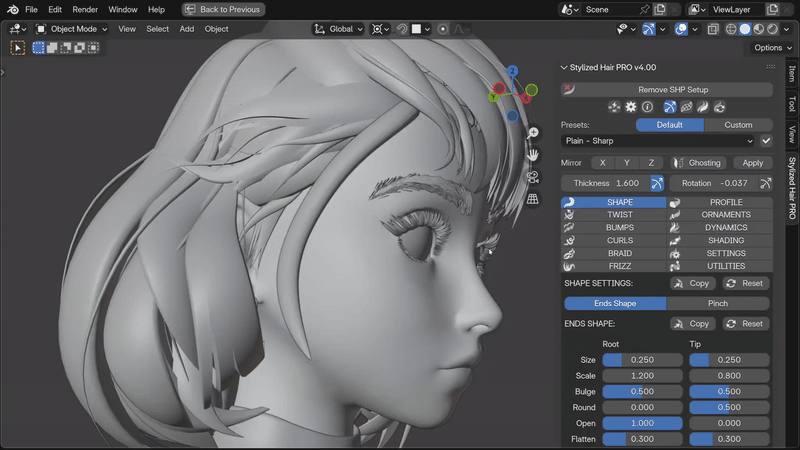
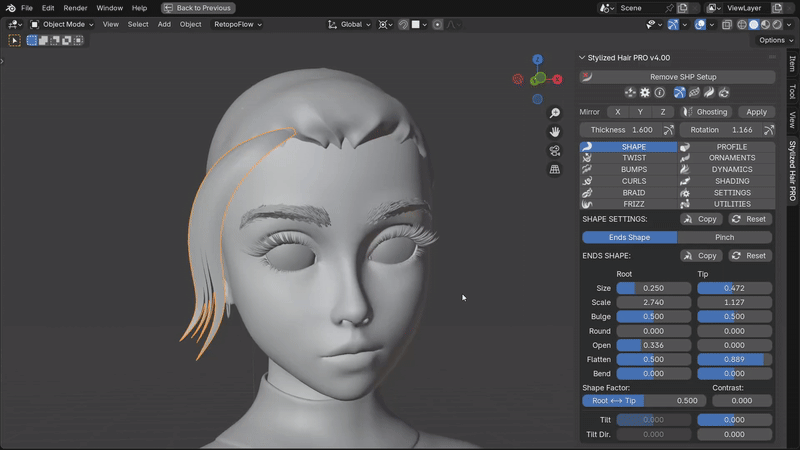
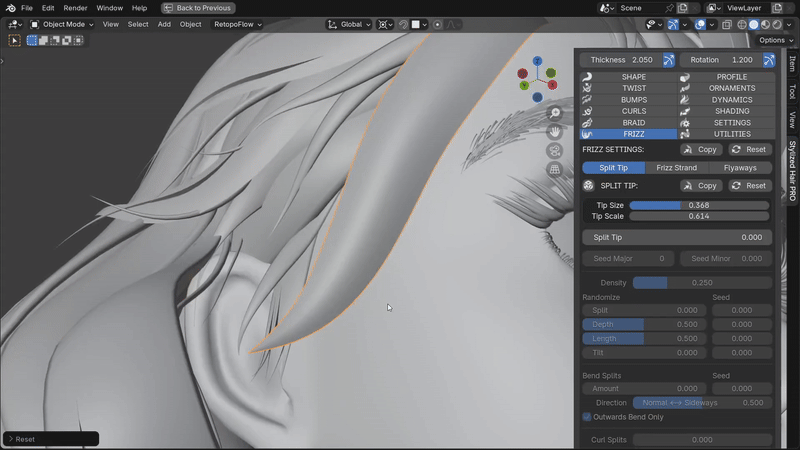
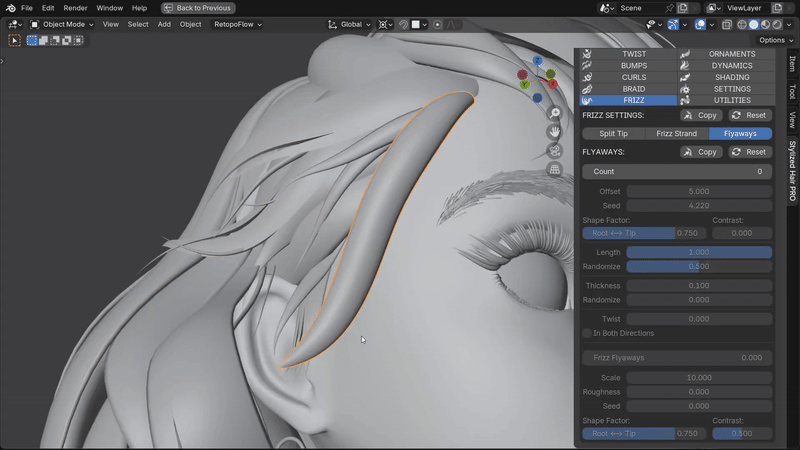
This is a Geometry Nodes based add-on for Blender, that will allow you to create stylized hairstyles in a streamlined, procedural way!
NOTE: This add-on works, with versions of Blender of 4.5 and above. Using it with older versions might cause malfunction! For older versions of Blender use any of the previous versions of the add-on.
For best experience, use the latest version of Blender if possible.
This tool is focused on working with the hair curves system in Blender, but I’ve also adapted it to be able to work with other curves (bézier , paths) in the more traditional way of stylized hair creation.
It features a lot of tools to create and control hair curves – from their shape, geometry, materials, ornaments, and even animating them with a Hair Dynamics system.
For the full set of features, watch the explainer video.
22-10-2025) Stylized Hair PRO v4.1.0:
https://cdn.iframe.ly/api/iframe?url=https%3A%2F%2Fyoutu.be%2FpE3ssl-11tM&key=31708e31359468f73bc5b03e9dcab7da
IMPORTANT: This version of Stylized Hair Pro requires Blender 4.5.0 or above. Using with older Blender versions will cause errors!
New Features and Improvements
General
- Reworked the node group to be optimized for Blender 4.5.
- Improved the visibility of the icons when using a light Blender theme.
Split Tip
- Split Tip functionality now works on all profile types, including Custom profiles.
- NOTE: Custom profile curves have to be a single spline curve object for the split to work. Multiple spline curves will disable the split tip effect.
- You can now set the exact splits count, rather than splits density.
- Splits Seed has smoother transition between the different variations.
- Improved the splits Bend and Curl for more consistent results.
- Splits Bend and Curl now have a Limit option to concentrate their effect towards the splits’ tips, muting it at their base.
- Added a new setting – ‘Limit Central Splits Bend’ to limit the bend of the central splits, lowering overlapping.
Bumps
- Regular Bumps can now be tapered in both directions.
- Improved the generated resolution when adding gaps between bumps for better results at low resolutions.
- Profiles maintain their sharp points when changing the profile resolution, so you get more accurate to the original shape at lower resolutions.
- Shift Volume on regular bumps produces slightly better shape.
Braids
- Braid strands Thickness and Flatten can now be set individually.
- Added a new setting for the braid roots Size Factor. This allows you to set where the braid root “connects” to the rest of the braid weave.
Profiles
- The Smart Profile functions now apply to all profile types.
- Removed the Robo profile type since it was clashing too much with the Split Tip function. Similar effect to it can be created with the Sub-strand bumps or a custom profile curve.
- Added a new Almond profile type. This was previously the default Smart Profile shape.
- Sharp points of custom profile curves are now preserved during resolution changes to maintain the overall shape of the profile at low resolutions.
- Custom Profile Collections can now be instanced entirely, creating more complex multi curve profiles.
Ornaments
- Added a new setting ‘Center Ornaments Position’ to help position custom ornaments to the curve.
Shading
- Reordered the UV maps so that the Combined UV Map is now the default when you use a shader node with a ‘UV’ output. This will help when using pre-made hair shaders.
- Added new shades to the SHP Shades node:
- Root Pinch Map
- Tip Pinch Map
- NOTE: The SHP Shades node in existing materials has to be updated for the new add-on version.
Hair Settings
- Added two new settings for the Auto-Squish Hair Root:
- Squish Strength – the amount of angle-based squishing
- Limit Squish – how much of the root length gets squished
Utilities
- Added two new features to the Optimization utility:
- Optimize Modifier – Dynamically select/deselect and collapse the SHP modifier, based on context. Helps a lot with performance in Blender 4.5
- Bake Hair Geometry – Bakes the generated hair geometry. Helps with performance during animation playback with dynamics, or just general as the hair geometry doesn’t need to be generated each frame.
- NOTE: Some of the functionality of the add-on will be lost while the hair strand is baked (like adjusting the hair shape or resolution). To regain full functionality, delete the hair bake. You can then bake the hair again when the changes are made. While baked, you can still groom the hair strands or use the dynamics for animation.
Gizmos
- Updated the Thickness and Pinch gizmos for more control over the shape.
- Added new gizmos:
- Curls
- Braid Shape
- Braid Strands
- Braid Roots
- Split Tip
- Resolution
- Added a new setting to pick on which curve to display the gizmos (Gizmos Curve Index)
- Added a new drop-down menu next to the gizmo toggle button with all gizmo controls.
Presets
- Updated the default presets for the new settings and refined their shape.
- NOTE: Older custom presets might not work with the new version of the add-on.
Fixes
- Fixed Mesh Conversion not working in Sculpt/Edit mode.
- Fixed an error when adding the setup to an empty curve object.
- Fixed tip/root tilt orientation in mirrored strands.
- Fixed tip shade appearing in secondary braid roots.
- Fixed sub-strands and random bumps only appearing in the main braid strand.
Reviews
There are no reviews yet.