
Swatcheroo for After Effects
Primary Keyphrase: color palette manager
Download Swatcheroo v1.1.2 for After Effects on Windows and Mac, a powerful color palette manager that streamlines how you create, save, and apply colors across your projects. Work smarter with an intuitive interface that lets you generate colors using the native color picker, pick colors directly from your composition, and instantly apply them to multiple layers with built-in multi-selection support.
Key Features of Swatcheroo v1.1.2:
- Instant Color Application: Apply saved colors to selected layers with a single click—supports solids, shape layers, text, and lights for comprehensive color management
- Smart Multi-Selection: Apply colors to multiple layers simultaneously with built-in multi-selection support for efficient workflow
- Visual Color Preview: See your saved colors at a glance with an attractive, intuitive interface that makes palette navigation effortless
- Composition Color Picker: Pick colors directly from any layer in your composition using the integrated eye dropper tool—perfect for matching existing elements
- Native Color Picker Integration: Generate new colors using After Effects’ native color picker for familiar, precise color selection
- Solid Layer Creation: Create new solid layers with your selected colors directly from the Swatcheroo interface
- Unlimited Palettes: Save and organize unlimited color palettes for different projects, clients, or moods
- Cross-Project Consistency: Maintain brand colors across multiple projects with easily accessible saved palettes
- v1.1.2 Update (Jan 12, 2021): Added compatibility with After Effects 2021 and 2019
- Broad Compatibility: Supports After Effects 2025 down through CC 2019 on both Windows and Mac
Perfect For:
- Motion graphics artists maintaining brand color consistency across projects
- Designers who work with multiple color palettes for different clients
- Anyone tired of manually entering hex codes or recreating colors
- Studios wanting to share standardized color libraries across teams
- Creators who value efficient, visual color management workflows
System Requirements:
- Adobe After Effects 2025, 2024, 2023, 2022, 2021, 2020, CC 2019
- Windows 10/11 (64-bit) or macOS
- 4GB RAM minimum (8GB+ recommended)
- 25MB available disk space
- Enable “Allow Scripts to Write Files and Access Network” in Preferences > Scripting & Expressions
Installation:
Copy the script file to your After Effects ScriptUI Panels folder:
- Windows:
C:\Program Files\Adobe\Adobe After Effects [version]\Support Files\Scripts\ScriptUI Panels\ - Mac:
/Applications/Adobe After Effects [version]/Scripts/ScriptUI Panels/
Access via Window menu > Swatcheroo
Note: Version 1.1.2 includes compatibility updates for After Effects 2021 and 2019 . The script is available for free, making it an essential addition to any motion designer’s toolkit .
Swatcheroo is your handy dandy swatch pal. That’s, uh, short for ‘palette.’
Photoshop’s got it! Illustrator’s got it! Animate’s got it– and now AE’s got it, too!
Swatcheroo is a super simple panel for applying, reading, and storing colours.
No clunky, slow, or weird expressions; no helper comps or other bloaty shortcuts.Just colours.

Read Colours
Store your project’s colours in Swatcheroo’s swatches!
Apply Colours
Use Swatcheroo’s swatches to colour your art!


Swap Colours
Strokes as Fills as Strokes!
Switch, with a flick.
Remove Colours
Who needs fills? And… strokes?! No thanks!

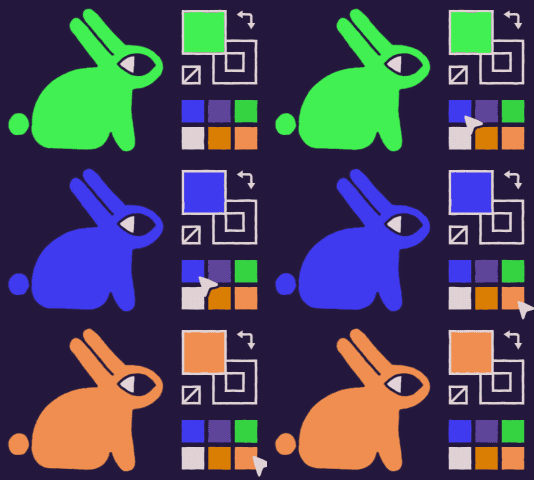
Swatch History
Remember, remember, the sixth colour of your client’s style guide.
Swatcheroo will remember the last swatch colours you’ve set, for easy access.
Or– lock specific swatches for later!
But Wait! There’s More!
“Shape layers are so 2017″– I get it. Swatcheroo also works on text!
And footage! ᶠᵒʳ ˢᵒᵐᵉ ʳᵉᵃˢᵒⁿ
Elevate your motion graphics workflow with premium collection of After Effects plugins. Whether you are a seasoned professional or just starting your VFX journey, powerful tools designed to streamline complex tasks, unlock creative possibilities, and save you hours of rendering time. From stunning glitch effects and seamless transitions to advanced 3D extrusion and text animation tools, each plugin in our library is rigorously tested for compatibility with the latest versions of Adobe after Effects. Enhance your video production value today and download industry-leading plugins that help you create breathtaking visuals without the technical headaches. Browse our full range and find the perfect extension to supercharge your editing suite now.
➡️ ➡️ For more after effects Plugins 😀 😀
➡️ ➡️ System requirements AE
Reviews
There are no reviews yet.