
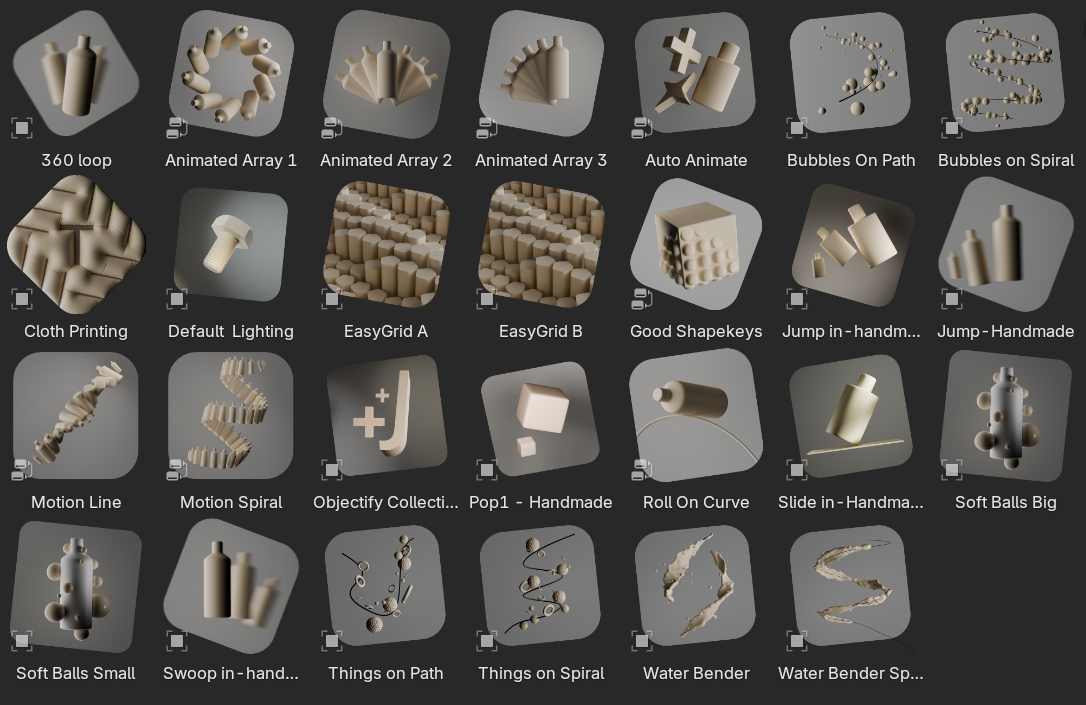
The Lazy Motion Library for Blender
The Lazy Motion Library for Blender – The Ultimate “Drag-and-Drop” Animation Preset Collection
Versions: v1.5
File Size: 61 MB
Download The Lazy Motion Library for Blender on Windows and Mac, a comprehensive, professionally curated collection of high-quality animation presets designed to accelerate your workflow by eliminating the need to keyframe common movements from scratch. From walk cycles and idle loops to camera moves and object transitions, this library provides instant access to production-ready motion data that can be applied to any rigged character or object with a single click, transforming how animators block out scenes, prototype ideas, and meet tight deadlines.
Key Features of The Lazy Motion Library:
- Massive Preset Collection: Includes over 500+ pre-made animation clips categorized into Locomotion (walks, runs, jumps, climbs), Gestures (waves, points, emotes), Idle Variations (breathing, shifting weight, looking around), Camera Moves (dolly, pan, orbit, handheld shake), and Object Animations (opening doors, rotating gears, bouncing balls).
- Universal Rig Compatibility: Animations are delivered in a standardized, retargeting-friendly format that works seamlessly with Rigify, Mixamo, Auto-Rig Pro, MetaHuman, and custom humanoid rigs, with built-in tools to adjust scale and proportions automatically.
- One-Click Application: Simply select your character or object, browse the library via the integrated Asset Browser panel, and drag-and-drop any motion preset onto the timeline—instantly applied with proper timing, easing, and root motion.
- Non-Destructive NLA Integration: All presets are applied as editable Action Strips in Blender’s Non-Linear Animation (NLA) editor, allowing you to blend, layer, trim, and adjust timing without overwriting your existing animation work.
- Procedural Variation System: Each preset includes randomized “seed” controls to generate infinite subtle variations (e.g., slightly different step timing, arm swing amplitude, or head turn angle), preventing repetitive, robotic movement in crowds or loops.
- Root Motion & In-Place Options: Every locomotion clip is available in both Root Motion (for moving across the level) and In-Place (for treadmill-style animation) variants, giving you flexibility for gameplay mechanics vs. cinematic cutscenes.
- Customizable Timing & Easing: Global sliders to adjust the speed, bounce, and easing curves of any applied preset, allowing you to quickly match the motion to your scene’s pacing without manual curve editing.
- Audio Sync Markers: Select presets include pre-placed markers aligned to common audio cues (footstep impacts, gesture beats, camera cuts), streamlining the process of syncing animation to sound.
- LOD Animation Variants: Many clips include simplified, low-keyframe-count versions optimized for background characters or distant objects, ensuring efficient playback in complex scenes.
- Regular Content Updates: Purchasers receive free lifetime updates, with new motion packs (e.g., “Combat Moves,” “Dance Styles,” “Creature Locomotion”) added quarterly to expand the library.
Perfect For:
- Indie Game Developers needing quick, high-quality character animations for prototypes and final builds without hiring a dedicated animator.
- Animators looking to speed up blocking and pre-vis by starting from professional base layers instead of empty keyframes.
- Motion Designers creating dynamic camera moves and object transitions for commercials, explainers, and social media content.
- VFX Studios populating crowd scenes with varied, non-repetitive background animation.
- Beginners learning animation principles who want to study professional timing and spacing by deconstructing ready-made clips.
- Generalists who need to animate occasionally but lack deep specialization in character performance.
System Requirements:
- Blender: 3.6, 4.0, 4.1, 4.2, 4.3, 4.4+ (Latest LTS recommended; NLA editor required).
- OS: Windows 10/11 (64-bit) or macOS 10.15+.
- RAM: 8GB minimum (16GB+ recommended for scenes with multiple animated characters).
- No external dependencies required.
Installation:
- Download the Lazy Motion Library
.zipfile or installer. - Extract the folder to a dedicated location on your drive (e.g.,
Assets/Motion_Library). - In Blender:
- Go to Edit > Preferences > File Paths.
- Under Asset Libraries, click the + icon and navigate to the extracted folder.
- Name it “Lazy Motion” and enable the checkbox.
- Open the Asset Browser workspace, select the “Lazy Motion” library from the dropdown, and start dragging animation presets onto your characters or into the Timeline.
Note:
The Lazy Motion Library lives up to its name by doing the heavy lifting for you. Unlike generic mocap databases that require extensive cleanup, every clip in this library has been hand-polished by professional animators to ensure clean foot planting, natural weight shifts, and appealing timing right out of the box. The addon includes a “Smart Retargeting” assistant that automatically detects your rig’s bone structure and adjusts the animation proportions to fit, reducing the typical retargeting workflow from hours to seconds. It also features a “Mix & Match” tool that lets you combine the legs from one preset (e.g., a walk) with the arms from another (e.g., a wave) to create custom hybrid animations instantly. Whether you are animating a solo hero character or a bustling crowd, The Lazy Motion Library provides the foundation to work faster, smarter, and with more creative freedom.
Supercharge your 3D creation workflow with premium selection of Blender Add-ons. Whether you are modeling intricate characters, sculpting realistic environments, or animating cinematic sequences, the right add-on can transform how you work inside Blender. Our curated collection includes powerful tools for UV unwrapping, procedural texture generation, rigging automation, rendering optimization, and more—each rigorously tested for compatibility with the latest Blender versions. Eliminate tedious manual processes and unlock advanced functionality that lets you focus on what matters most: bringing your creative vision to life. Explore our full range of professional Blender plugins today and take your 3D projects to the next level.
➡️ ➡️ For more Blender Plugins 😀 😀
Reviews
There are no reviews yet.