
trace generator for Blender
Trace Generator v1.0.0 for Blender – The Ultimate Contour, Cross-Section & Vector Tracing Suite
Download Trace Generator v1.0.0 for Blender on Windows and Mac, a highly specialized utility designed to automatically generate precise 3D contour lines, cross-sections, and vector curves from both 3D meshes and 2D images. Whether you need to create topographic maps for architectural site plans, extract cross-sectional profiles for product design, prepare vector files for laser cutting and CNC routing, or trace a 2D sketch into editable 3D curves, Trace Generator automates the tedious slicing and tracing process. It bridges the gap between digital 3D modeling, 2D drafting, and physical fabrication with mathematical precision.
Key Features of Trace Generator v1.0.0:
- Automated Topographic Contours: Instantly slice any 3D mesh at specific Z-height intervals to generate clean, perfectly spaced 3D contour curves. Ideal for creating topographic site plans, stylized NPR maps, and terrain analysis.
- Multi-Axis Cross-Section Generator: Extract precise cross-sectional profiles along any custom axis, or sweep a cutting plane along a complex curve path to generate continuous structural traces.
- 2D Image to 3D Curve Tracing: Auto-trace high-contrast 2D images, logos, or hand-drawn sketches directly into clean, editable Bezier or NURBS curves. The smart algorithm detects edges and converts them into optimized vector paths.
- Smart Curve Cleanup & Optimization: Automatically removes duplicate vertices, smooths jagged pixelated traces, and optimizes curve handles to ensure your generated lines are mathematically clean and ready for manufacturing or animation.
- Laser Cut & CNC Export Prep: Seamlessly flattens and exports your generated 3D traces into perfectly scaled 2D vector formats (DXF, SVG, PDF). Includes automatic nesting tools to minimize material waste for physical fabrication.
- Variable Thickness & Extrusion: Instantly convert 1D curve traces into 2D surfaces or 3D extruded meshes. Control the thickness dynamically based on the object’s height, curvature, or the brightness of the source image.
- NPR & Stylized Map Generation: Create instant topographic, bathymetric, or contour-style line maps for non-photorealistic rendering, complete with customizable line weights and color ramps based on elevation.
- Geometry Nodes Backend: Built entirely on Geometry Nodes, ensuring that all tracing operations are 100% non-destructive. Adjust the slice interval, curve resolution, or tracing threshold at any time without recalculating from scratch.
- Batch Processing: Select multiple objects and generate contours or cross-sections for all of them simultaneously, perfect for analyzing complex assemblies or generating site plans for multiple buildings.
- Visual Slice Preview: Toggle a real-time viewport overlay that shows exactly where the cutting planes or tracing thresholds are positioned before you commit to generating the final curves.
Perfect For:
- Architectural Visualizers generating accurate topographic contour maps, site plans, and structural cross-sections for client presentations.
- Product & Industrial Designers extracting precise 2D profiles and cross-sections from 3D CAD models for technical drafting and manufacturing.
- Makers & Fabricators preparing 3D models for laser cutting, CNC routing, or vinyl plotting by generating clean, flat vector traces.
- NPR & Stylized Artists creating comic-book style topographic backgrounds, contour maps, and abstract line-art animations.
- Technical Directors analyzing mesh topology, wall thickness, and structural intersections using automated cross-section tools.
- Concept Artists rapidly converting 2D reference sketches or logos into 3D curve networks for further modeling.
System Requirements:
- Blender: 3.6, 4.0, 4.1, 4.2, 4.3, 4.4+ (Geometry Nodes heavily utilized; optimized for Blender 4.x).
- OS: Windows 10/11 (64-bit) or macOS 10.15+.
- RAM: 8GB minimum (16GB+ recommended for tracing high-resolution images or generating contours on massive meshes).
- No external dependencies required.
Installation:
- Download the Trace Generator v1.0.0
.zipfile. - Open Blender and go to Edit > Preferences > Add-ons.
- Click Install…, select the downloaded file, and enable the checkbox next to Object: Trace Generator.
- Access via the 3D Viewport Sidebar (N-panel) under the Trace Gen tab, or the Object Context Menu (Right-Click) > Generate Traces.
Key Highlights of the v1.0.0 Release:
- Unified Tracing Engine: Combines mesh-slicing (contours) and image-vectorization (tracing) into a single, cohesive interface, eliminating the need for multiple disparate addons.
- Blender 4.4 Compatibility: Fully updated to support the latest Geometry Nodes simulation fields and curve evaluation APIs, ensuring rock-solid stability and fast viewport performance.
- Direct DXF/SVG Export: Integrated native export functionality that automatically scales and aligns your traces to real-world dimensions (millimeters/inches) for direct import into AutoCAD, Illustrator, or laser cutter software.
- Adaptive Curve Resolution: The image tracer now automatically adjusts the curve resolution based on the complexity of the image, keeping file sizes small while preserving sharp corners.
- Contour Smoothing Algorithm: Added a specialized smoothing pass for mesh contours that eliminates the “stair-step” artifacts common in low-poly mesh slicing, resulting in beautiful, flowing topographic lines.
- UI Overhaul: A clean, tabbed interface separating “Mesh Contours,” “Cross-Sections,” and “Image Tracing” for a logical, distraction-free workflow.
Note:
Trace Generator v1.0.0 is an indispensable tool for anyone who works at the intersection of digital 3D design and physical reality. Manually slicing a mesh to create topographic lines, or trying to trace a logo in Illustrator and importing it back into Blender, are workflows that waste hours of valuable time. Trace Generator brings these capabilities directly into your 3D viewport with mathematical precision. Because it is built on Geometry Nodes, you retain complete non-destructive control—change the height of your terrain, and the contour lines update instantly. Whether you are preparing files for a laser cutter, drafting a technical cross-section, or creating a beautiful stylized contour map, Trace Generator delivers flawless results in seconds.
Free Trace Generator: Convert 2D Images into 3D Shapes
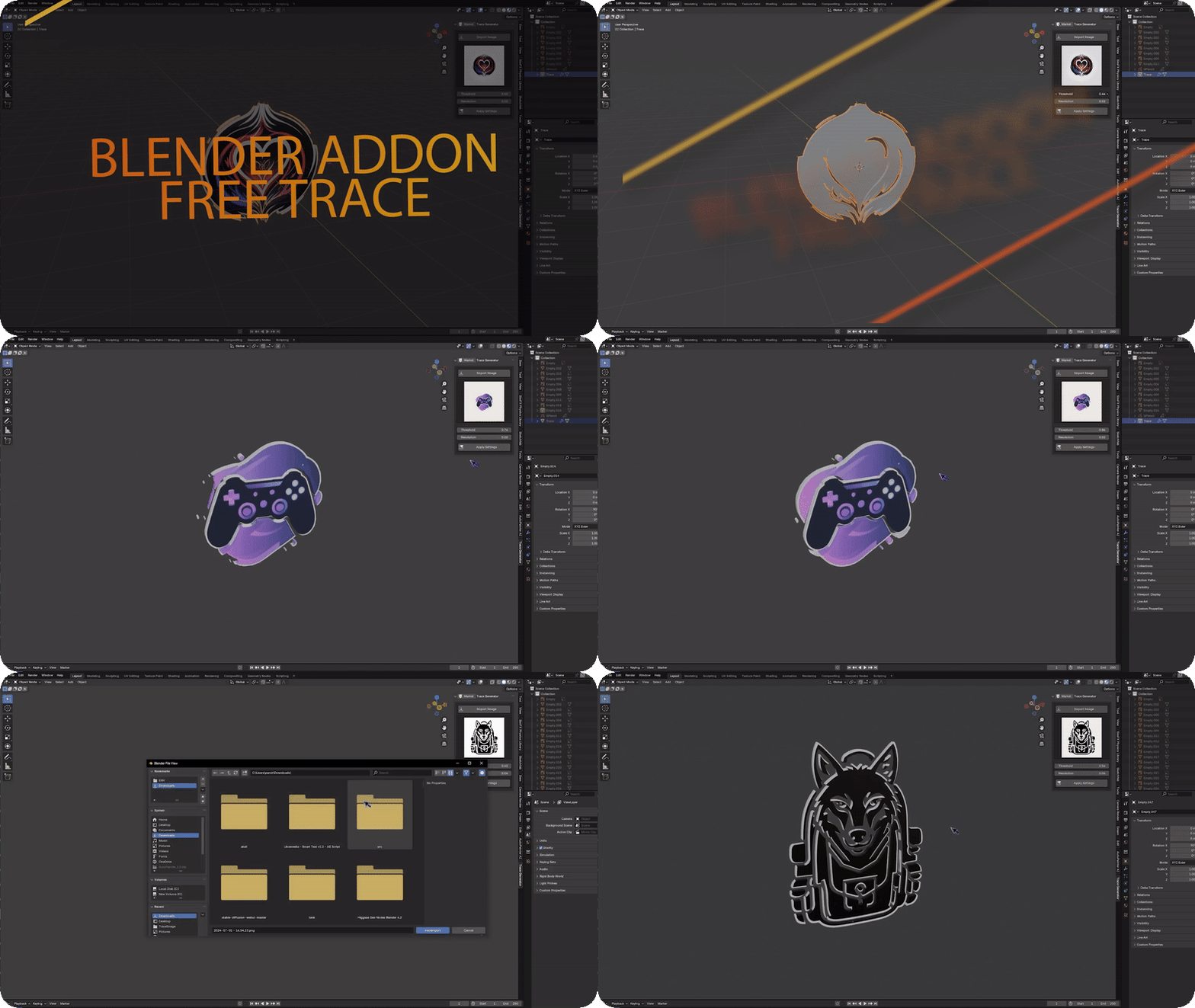
Unlock the power of 3D modeling with Free Trace Generator, a versatile Blender addon designed to effortlessly transform 2D images into 3D shapes. Whether you’re working with logos, sketches, or intricate designs, this tool offers a seamless workflow for converting flat images into detailed, three-dimensional models. Perfect for artists, designers, and creators looking to enhance their projects with a quick and intuitive trace-to-3D process.
Key Features:
- Instant Conversion: Convert 2D images into 3D shapes with just a few clicks.
- Customizable Output: Adjust depth, smoothness, and shape complexity to fit your design needs.
- High Compatibility: Works with any 2D image, from simple icons to complex illustrations.
- Efficient Workflow: Save time by bypassing manual modeling and jump straight into rendering or animation.
- Free to Use: Enjoy the full suite of features without any cost.
Supercharge your 3D creation workflow with premium selection of Blender Add-ons. Whether you are modeling intricate characters, sculpting realistic environments, or animating cinematic sequences, the right add-on can transform how you work inside Blender. Our curated collection includes powerful tools for UV unwrapping, procedural texture generation, rigging automation, rendering optimization, and more—each rigorously tested for compatibility with the latest Blender versions. Eliminate tedious manual processes and unlock advanced functionality that lets you focus on what matters most: bringing your creative vision to life. Explore our full range of professional Blender plugins today and take your 3D projects to the next level.
➡️ ➡️ For more Blender Plugins 😀 😀
Reviews
There are no reviews yet.