
Transfer Vertex Order for Blender
transfer vertex order addon
Transfer Vertex Order v2.3 for Blender – Advanced Vertex Order Management & Transfer Tool
Download Transfer Vertex Order v2.3 for Blender on Windows, Mac, and Linux, a specialized add-on that transfers vertex order between meshes with identical geometry. Essential for shape key workflows, blend shape transfers, and character rigging—ensure consistent vertex indexing between meshes for accurate deformation .
Key Features of Transfer Vertex Order v2.3:
- Vertex Order Transfer: Copy vertex order from reference mesh to target mesh
- Shape Key Preservation: Maintains shape key functionality after vertex order changes
- Multi-Mesh Support: Transfer vertex order between multiple meshes simultaneously
- Automatic Matching: Matches vertices between meshes by position
- Manual Matching: Manual vertex correspondence for complex cases
- Validation Tools: Check vertex order consistency before and after transfer
- Batch Processing: Process multiple objects with one operation
- Error Detection: Identifies meshes that cannot be matched
- Undo Support: Safe experimentation with full undo
- v2.3 Updates: Enhanced matching algorithms, improved performance, and compatibility with Blender 4.0+
Perfect For:
- Character artists transferring shape keys between meshes
- Game developers maintaining blend shape compatibility
- Rigging artists ensuring consistent mesh deformation
- VFX professionals preparing models for animation
- Anyone working with shape keys and blend shapes
System Requirements:
- Blender 3.6, 4.0, 4.1, 4.2, 4.3
- Windows 10/11 (64-bit), macOS, or Linux
- 4GB RAM minimum (8GB+ recommended)
- 5MB available disk space
Installation:
- Download the add-on zip file
- In Blender, go to Edit > Preferences > Add-ons
- Click “Install” and select the downloaded zip file
- Enable the add-on by checking the box next to “Transfer Vertex Order”
Note: Transfer Vertex Order is essential for shape key and blend shape workflows, ensuring consistent vertex indexing between meshes for accurate deformation . The automatic matching and batch processing make it invaluable for character artists and game developers . Version 2.3 includes full compatibility with Blender 4.0 and above . Designed for Blender 3.6 and above . Perfect for vertex order management . Essential for any shape key workflow .
Addon will be located in right 3d View Sidebar(N) -> Tools panel
See video tutorial about addon made by Danny Mac 3D here.
This blender addon makes it possible to transfer the vertex order (face and edge too since 2.2 update), from mesh A to mesh B, if both of them have the same topology (same vertex count, same polygon count).
With vert order copied you will be able to transfer mesh attributes like uv, weights, colors etc. by using Data Transfer modifier (and using’Topology’ vertices matching).
For vert id transfer, if two meshes have same vertices position, you can use object mode ‘ctrl+c’ menu -> Transfer vert ID by vert proximity. Just select target object(s), then source mesh and use ctrl+c to transfer ids from source mesh to target mesh.
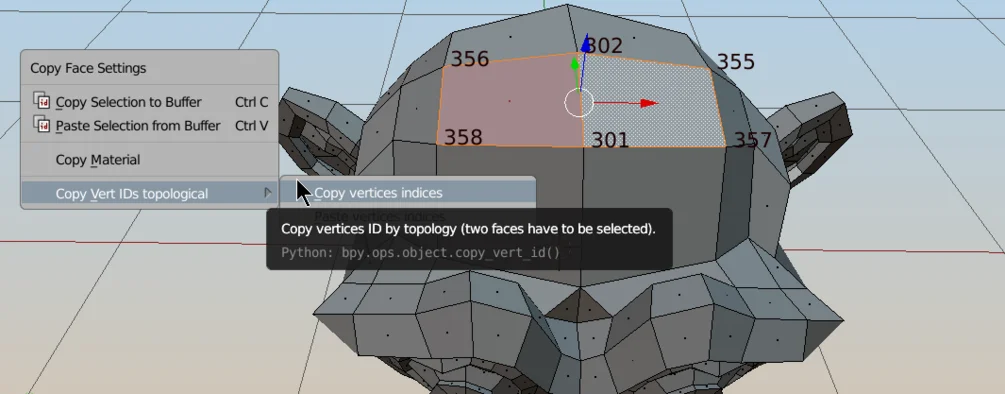
If two meshes have different vertices positions use editmode ctrl+c menu – Copy vert ID topological. First you need to select two, adjacent faces on source mesh – copy mesh id’s with ctrl+c menu, and then, select two similar faces on target mesh and paste IDs. Operation has to be repeated for each island (disconnected mesh parts) separately.
Since version 2.3 now there is also option to Transfer vert IDs using matching UVs.
This addon is using ‘Copy Attributes Menu’ addon, which is build-in into blender.
You can preview vert IDs by using MeasureIt addon (also build-in into blender).
This addon is base on Magic UV – UV Topological transfer script.
Update 2.1 and 1.1 for both Blender 2.8 and 2.79 (13.06.2019):
- massive speed bump on high-poly meshes (thx. to zagzag)
Update 2.2 (blender 2.8 only)
- from now on all data is transfered (vertices ids, face ids, edge ids)
Update 2.3 ( 13.05.2022)
- New option to transfer Vert IDs using matching UVs
Update 2.4 ( 11..02.2025)
- Option to copy and paste verts order in one go
- option to preview/debug already transferred verts ids – by ‘VTX_TRANSFER’ color attribute (colored verts – ids were transferred, white – not yet)
Supercharge your 3D creation workflow with premium selection of Blender Add-ons. Whether you are modeling intricate characters, sculpting realistic environments, or animating cinematic sequences, the right add-on can transform how you work inside Blender. Our curated collection includes powerful tools for UV unwrapping, procedural texture generation, rigging automation, rendering optimization, and more—each rigorously tested for compatibility with the latest Blender versions. Eliminate tedious manual processes and unlock advanced functionality that lets you focus on what matters most: bringing your creative vision to life. Explore our full range of professional Blender plugins today and take your 3D projects to the next level.
➡️ ➡️ For more Blender Plugins 😀 😀
Reviews
There are no reviews yet.