

Vector to 3D for Blender
Vector to 3D v1.0.0 for Blender
The Ultimate One-Click SVG to 3D Model Conversion Tool
File Size: 6.1 MB
Download Vector to 3D v1.0.0 today. Consequently, you can instantly transform any SVG file into a clean, production-ready 3D model with just a single click . Because designers, game developers, and motion graphics artists frequently need to bring 2D logos, icons, and UI elements into 3D space, having access to an efficient conversion tool is absolutely essential. Nevertheless, manually modeling vector-based designs in 3D can consume countless hours of valuable production time. Fortunately, Vector to 3D eliminates this bottleneck completely. Moreover, it provides intuitive controls for extrusion depth, bevels, and resolution, ensuring professional-quality results without complex workflows . In short, you can convert any vector design into a stunning 3D model in moments.
Core One-Click Conversion Workflow
The foundation of this addon lies in its remarkably simple and intuitive process. For instance, you begin by importing your vector file using the dedicated Import Vector File (SVG) button . Furthermore, the addon provides a convenient Icon Selection Panel that allows you to browse and select your desired layer or icon from the imported file . Since the entire workflow is streamlined into just a few steps, you can focus on your creative vision rather than technical setup. Consequently, even users new to 3D modeling can achieve impressive results with minimal effort.
Customizable Settings for Professional Results
Professional-quality 3D models demand precise control over geometry and appearance. Therefore, the addon includes adjustable settings that give you complete creative freedom . For example, you can customize extrusion depth to control how thick your model appears, adjust bevels to create smooth or sharp edges, and fine-tune curve offsets for polished detailing . Since all parameters are exposed through an intuitive interface, you can experiment freely and iterate quickly. Thus, your final 3D models will maintain a clean, professional appearance suitable for icons, logos, banners, UI/UX mockups, and much more .
Seamless Compatibility with Popular Vector Software
Professional designers work across multiple platforms and tools. Therefore, Vector to 3D is designed to work with any vector design software you already use . For instance, the addon fully supports files exported from Illustrator, Figma, Inkscape, CorelDRAW, and other industry-standard vector editors . This compatibility ensures you can seamlessly integrate 3D conversion into your existing design pipeline without changing your preferred tools. Consequently, your workflow remains efficient and uninterrupted.
Blender 4.3+ Compatibility
Vector to 3D v1.0.0 is fully compatible with Blender 4.3, ensuring seamless integration with the latest Blender features and workflow improvements . The addon is distributed as a standard ZIP file for easy installation through Blender’s Preferences panel . It works across all major operating systems including Windows and macOS . You will need a standard workstation with at least 8GB of RAM, though requirements are minimal given the addon’s lightweight nature.
Perfect for Designers, Developers, and Motion Artists
This addon is particularly well-suited for 3D designers who need to quickly convert logos and icons into 3D assets . Similarly, game developers will appreciate the ability to create UI elements and props efficiently . Additionally, UI/UX designers and motion graphics artists can leverage the tool to bring their 2D designs into 3D space for enhanced presentations and animations . Ultimately, Vector to 3D accelerates your entire design and production pipeline.
Installation and Usage Guide
To install, first download the ZIP file from your library. Next, open Blender and navigate to Edit > Preferences > Add-ons. Then, click the arrow in the top right corner and select “Install from Disk” . After that, locate and select the downloaded ZIP file, then enable the Vector to 3D addon. Finally, click the Import Vector File (SVG) button, select your desired layer in the Icon Selection Panel, customize your extrusion depth, bevels, and resolution settings, then click Apply & Convert Mesh to generate your 3D model instantly . Thus, your professional one-click SVG conversion workflow will be ready instantly.
What is Included Inside?
The pack contains the complete Vector to 3D v1.0.0 addon . Furthermore, it includes the intuitive one-click conversion system, customizable settings panel, and Icon Selection Panel for layer management . Additionally, you receive full compatibility with all major vector design software formats . Ultimately, you receive everything needed for professional one-click SVG to 3D conversion.
Final Thoughts on the Addon
Effortless one-click SVG to 3D conversion evokes profound creative freedom. Therefore, this addon provides the ultimate foundation for your design and development workflows. You can transform any vector design into a stunning 3D model with unprecedented speed and simplicity. Consequently, your creative vision becomes a stunning reality.
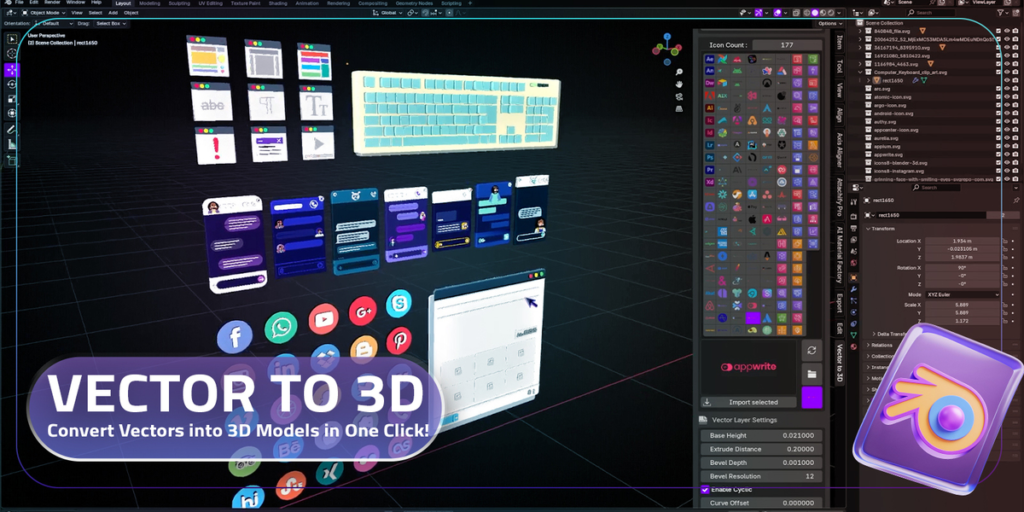
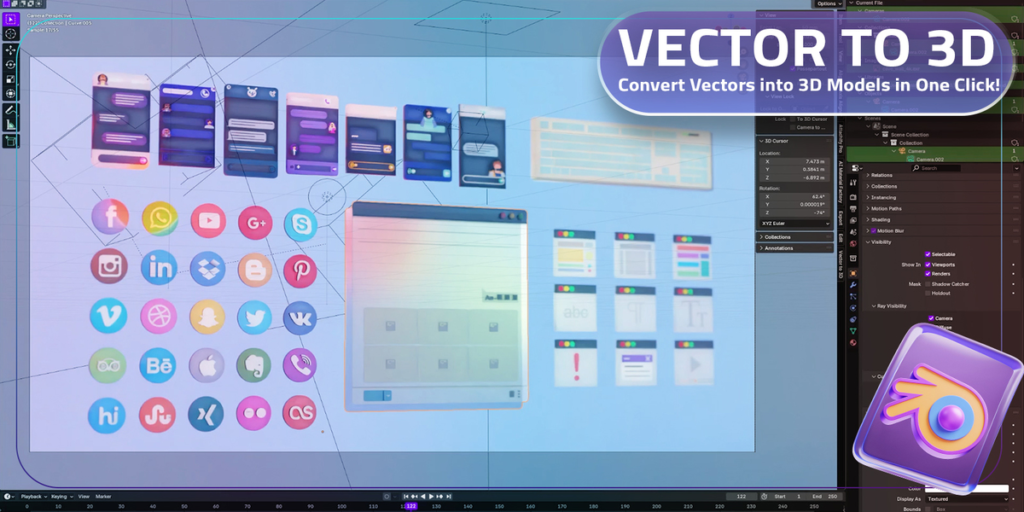


Vector to 3D – Convert SVG to 3D Models in One Click!Bring your designs to life with the Vector to 3D Blender addon! With just one click, you can convert your files into stunning, high-quality 3D models. Perfect for creating 3D icons, banners, UI/UX mockups, logos, and much more without the need for complex workflows or manual modeling.Key Features✨ One-Click Conversion: Instantly transform any SVG file into a clean 3D model.🎨 Customizable Settings: Adjust extrusion depth, bevels, and resolution for a polished look.🖌️ Works with Any Vector Software: Compatible with Illustrator, Figma, Inkscape, CorelDRAW, and more.🚀 Perfect for Designers: Create 3D icons, banners, and mockups for branding and UI/UX projects.🔗 Seamless Integration: Works directly inside Blender with an intuitive interface.How It Works📂 Import your vector design using the Import Vector File (SVG) button.🖼️ Browse and select your desired layer/icon in the Icon Selection Panel.⚙️ Customize the settings, such as extrusion depth, bevels, and curve offsets.✅ Click Apply & Convert Mesh to generate your 3D model!Who Is This For?Whether you’re a 3D designer, game developer, UI/UX designer, or motion graphics artist, this addon is the perfect tool to bring your ideas to life in 3D.
Supercharge your 3D creation workflow with premium selection of Blender Add-ons. Whether you are modeling intricate characters, sculpting realistic environments, or animating cinematic sequences, the right add-on can transform how you work inside Blender. Our curated collection includes powerful tools for UV unwrapping, procedural texture generation, rigging automation, rendering optimization, and more—each rigorously tested for compatibility with the latest Blender versions. Eliminate tedious manual processes and unlock advanced functionality that lets you focus on what matters most: bringing your creative vision to life. Explore our full range of professional Blender plugins today and take your 3D projects to the next level.
➡️ ➡️ For more Blender Plugins 😀 😀
➡️ ➡️ System requirements For Blender
Reviews
There are no reviews yet.