
Viewfinder for Blender
Viewfinder v1.8.0 for Blender – The Ultimate Camera Composition, Framing & Storyboarding Suite
Download Viewfinder v1.8.0 for Blender on Windows and Mac, a specialized cinematography and composition addon designed to transform your 3D viewport into a professional director’s monitor. For 3D artists, animators, and architectural visualizers, setting up the perfect shot often involves tedious camera tweaking, guessing focal lengths, and manually overlaying aspect ratio guides. Viewfinder completely streamlines the pre-visualization and framing process by providing a comprehensive suite of composition overlays, lens visualizers, and storyboard management tools. It allows you to “direct” your scene with the precision of a Hollywood cinematographer, ensuring every frame is perfectly balanced and ready for the final render.
Key Features of Viewfinder v1.8.0:
- Dynamic Composition Guides: Instantly overlay professional framing guides directly in the viewport. Choose from the Rule of Thirds, Golden Ratio, Phi Grid, Dynamic Symmetry (X and armature), and Diagonal Methods to ensure your shots are visually balanced and engaging.
- Cinematic Aspect Ratios & Safe Areas: One-click toggles for standard and cinematic aspect ratios (16:9, 2.39:1 Anamorphic, 1:1 Square, 9:16 Vertical). Includes customizable Action Safe and Title Safe margins to ensure critical elements aren’t cut off by displays or crops.
- Instant Letterboxing: Add beautiful, non-destructive cinematic black bars to your viewport and final renders with a single click. Perfect for testing widescreen compositions without actually changing your render resolution.
- Lens & DOF Visualizer: A real-time HUD that displays your current focal length, f-stop, and sensor size. Includes a visual “Depth of Field Cone” that shows exactly what is in focus and what is falling into bokeh, taking the guesswork out of camera settings.
- Cinematic Lens Presets: Instantly snap your camera to industry-standard focal lengths (e.g., 24mm for wide establishing shots, 50mm for natural perspective, 85mm for flattering portraits) with automatically adjusted sensor sizes to mimic real-world cinema cameras.
- Storyboard & Shot Manager: Organize your scene’s cameras visually. Save specific camera states, assign them custom names and thumbnail previews, and arrange them in a sequential storyboard list to plan out your animation or architectural walkthrough.
- Reference Image Matching: Import a 2D reference photo or concept art, and Viewfinder will help you match the camera’s focal length, field of view, and lens distortion to perfectly align your 3D scene with the 2D image.
- Anamorphic Lens Simulator: Preview the unique look of anamorphic photography, including horizontal lens flares, oval bokeh shaping, and subtle horizontal stretching, directly in the Eevee or Cycles viewport.
- Multi-Camera Quick Switcher: Easily manage scenes with dozens of cameras. Viewfinder provides a clean, visual dropdown to jump between cameras, complete with hotkey support for rapid shot-to-shot playback.
- Storyboard Sheet Export: One-click tool to export your current camera views into a clean, formatted PDF or image grid, complete with shot numbers, focal lengths, and notes—perfect for client presentations and pre-vis approvals.
Perfect For:
- Cinematographers & Pre-vis Artists planning complex camera moves, blocking scenes, and establishing visual continuity before final animation.
- Architectural Visualizers framing the perfect interior and exterior shots, ensuring clients see the space exactly as intended with correct human-eye perspective.
- Animators & Directors storyboarding sequences, managing multiple scene cameras, and checking composition against cinematic aspect ratios.
- Motion Designers creating perfectly framed vertical videos for social media (9:16) or square formats for Instagram without cropping the 3D canvas.
- Concept Artists using the viewport as a digital sketchbook, utilizing composition guides to quickly block out dynamic camera angles for matte paintings.
- Freelancers who need to present professional, well-composed stills and animatics to clients to get quick approvals before spending hours on final rendering.
System Requirements:
- Blender: 3.6, 4.0, 4.1, 4.2, 4.3, 4.4+ (Latest LTS recommended).
- OS: Windows 10/11 (64-bit) or macOS 10.15+.
- RAM: 4GB minimum (Negligible performance impact; runs entirely as a viewport overlay).
- Render Engine: Fully compatible with Cycles and Eevee (Overlays work seamlessly in both).
Installation:
- Download the Viewfinder v1.8.0
.zipfile. - Open Blender and go to Edit > Preferences > Add-ons.
- Click Install…, select the downloaded file, and enable the checkbox next to Camera: Viewfinder.
- Access via the 3D Viewport Sidebar (N-panel) under the Viewfinder tab, or the Camera Properties panel when a camera is selected.
What’s New in v1.8.0?
- Blender 4.4 Full Compatibility: Updated all camera and viewport drawing APIs to ensure flawless stability, correct UI scaling, and perfect integration with the new AgX color management in Blender 4.4.
- New “Anamorphic” Module: Added a dedicated simulator for anamorphic lenses, including real-time oval bokeh previews and horizontal streak flares that react to emissive objects in the scene.
- Enhanced Golden Spiral: The Golden Ratio guide now includes an interactive gizmo, allowing you to rotate and flip the spiral to perfectly frame your subject’s eyes or key focal points.
- Faster Storyboard Rendering: Optimized the thumbnail generation for the Shot Manager, reducing the wait time when building a 50-shot storyboard sequence by 70%.
- Vertical Video Presets: Added dedicated 9:16 and 4:5 aspect ratio presets with optimized title-safe zones specifically designed for TikTok, Reels, and Shorts.
- Bug Fix: Resolved a rare issue where cinematic letterboxing bars would occasionally clip or misalign when switching between Perspective and Orthographic camera views.
Note:
Viewfinder v1.8.0 is built on the philosophy that composition is just as important as the 3D model itself. You can have the most beautifully lit and detailed scene in the world, but if the camera angle is poorly framed, the shot will fail. Viewfinder brings the tools of a real-world film set directly into Blender. Instead of blindly moving the camera and hoping it looks good, you are actively directing the frame, using mathematically proven composition guides, and testing cinematic lens characteristics in real-time. Whether you are pre-vising a short film, framing a luxury real estate render, or storyboarding a commercial, Viewfinder ensures every shot you deliver is a masterpiece of visual storytelling.
Viewfinder
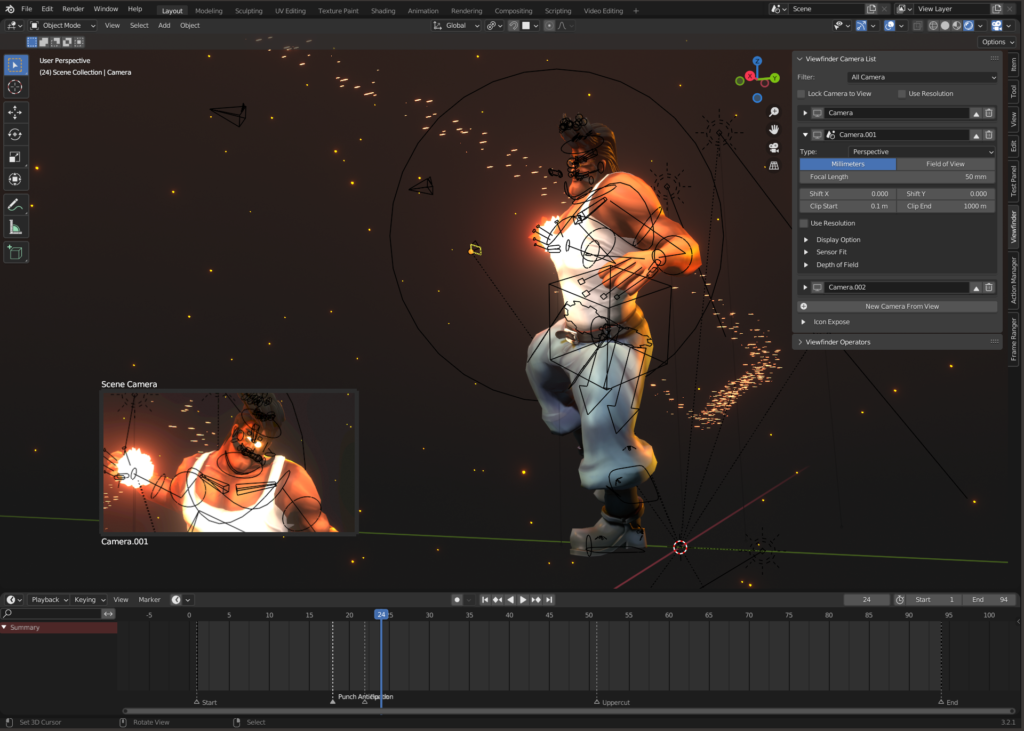
Elevate your camera game in Blender with Viewfinder! Viewfinder is especially helpful when you have a large environment with many cameras. It helps you organize and preview your cameras, you can also switch your cameras with ease. It even has a small overlay to view your camera while you work on your scene.
Highlighted Features
Viewfinder comes with many utility features for cameras, below are the highlighted features in Viewfinder.
Camera Switching
This addon presents the camera in a list form to help you easily switch between multiple cameras.
Camera Organization
You can view all your cameras on the side panel for easy access, simplifying the process of managing multiple cameras in the scene.
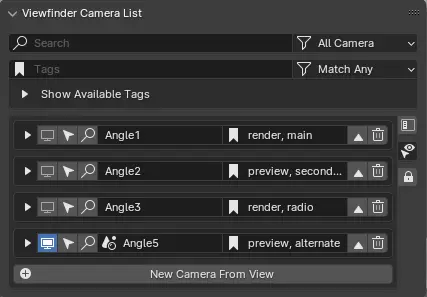
Cameras can be tagged and filtered for organization purpose.
With each camera item listed, you can do the following.
- View the Camera
- Select the Camera
- Find the Camera (Frame Selected)
- Bind Camera to Timeline Markers
- Remove the Camera
- Change the Camera Settings
Camera Preview
You can preview active camera without looking into the camera.
Note
Cycles Render will not show in Camera Preview.
Easy Camera Creation
You can easily create a camera in your scene and bind it to a marker at the current frame.
Chaneglog:
| Old Changelog 17/12/2021: Addon Released!30/12/2021: Added Ability to Store and Set Resolution on Camera!24/4/2022: Renamed Some Operators to Be Less Confusing |
| Viewfinder 1.6.0– 10/02/20241. Added Pin Camera, Camera Priority (Reordering), Select Camera Target (Constraint), Collapse Subpanel Toggle |
| Viewfinder 1.7.0– 10/06/20241. UI Changes – Side ButtonSome Buttons are moved to the side, similar to typical Listbox UI in Blender.Toggle All Subpanel and Lock Camera to View is moved to the Side.Create Camera From View is also added to the side, but the button below the list still remainsIcon Expose button will be move to the side as menu to stay consistent with All TinkerBoi AddonThe Camera Filter (Active, Selected, Scene, All is now next to the Search BoxAdded Tag Filter Search Box2. Tag SystemViewfinder will be getting a Tag System similar to Action CommanderThe Tags can be toggled by clicking the buttonsYou can Filter by Match All or Match Any3. Remove Redundant FeatureFix Spelling Mistake in Preferences (Viewfinder Operator Panel -> Viewfinder Camera List Panel)4. Fixing Mistake in PreferencesFix Boolean for Viewfinder Camera List Panel in Preferences |
| Viewfinder 1.8.0– 23/07/2024No New Feature is added Fix Error when camera have constraints that has no target attributeAdd Name Property to Create Constrained Camera From Selected CurvesFix Create Constrained Camera From Selected Curves Mistake (Apparently it creates Curve Object for no Reason) |
| Viewfinder 1.8.1– 23/11/2024No New Feature is added- Tested and is Compatible on Blender 4.3 Bug Fixes Fix Active Camera Mode attempt to display non camera object and throwing errors in consoleFix Create New Camera with “Camera Marker with Current Frame” option to properly switch Camera after creationAdded an Option to Hide Camera Preview Icon in Preferences |
Supercharge your 3D creation workflow with premium selection of Blender Add-ons. Whether you are modeling intricate characters, sculpting realistic environments, or animating cinematic sequences, the right add-on can transform how you work inside Blender. Our curated collection includes powerful tools for UV unwrapping, procedural texture generation, rigging automation, rendering optimization, and more—each rigorously tested for compatibility with the latest Blender versions. Eliminate tedious manual processes and unlock advanced functionality that lets you focus on what matters most: bringing your creative vision to life. Explore our full range of professional Blender plugins today and take your 3D projects to the next level.
➡️ ➡️ For more Blender Plugins 😀 😀
Reviews
There are no reviews yet.