
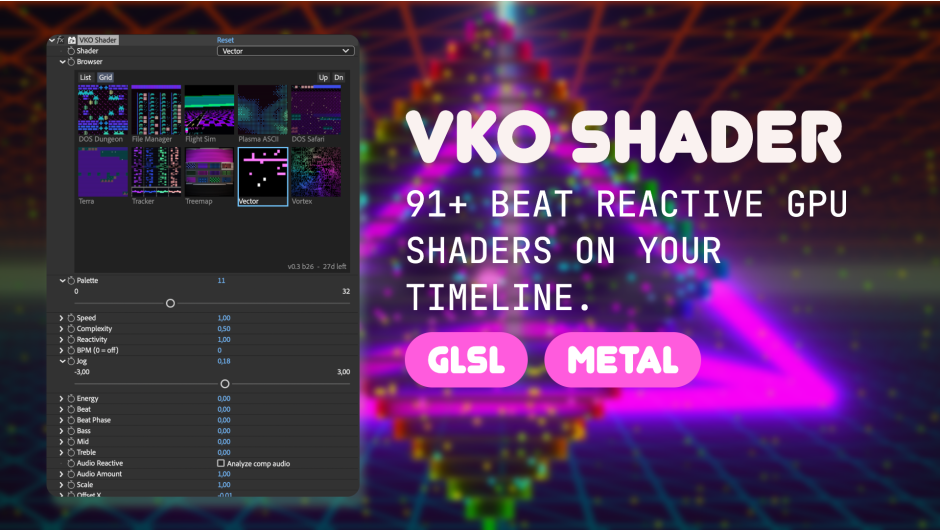
VKO Shader for After Effects
VKO Shader V1.3 for After Effects
The Ultimate Native GPU Shader Engine and Generative Visual Tool for After Effects
Download VKO Shader V1.3 today. Consequently, you can run real GLSL shaders directly on your timeline and create stunning generative motion graphics without pre-rendering or external apps. Because modern motion design and VJ visuals demand real-time, audio-reactive effects, having a native shader engine is absolutely essential.
Nevertheless, simulating complex shader looks usually requires stacking plugins or rendering loops in external software. Fortunately, VKO Shader eliminates this bottleneck completely. Moreover, it runs on the GPU using Metal on Mac and Direct3D 11 on Windows for identical cross-platform results. In short, you can browse, click, and render professional shader effects instantly.
Comprehensive Shader Library and Custom GLSL
The core of this plugin lies in its massive, ready-to-use shader library. For instance, it includes 91 built-in shaders covering styles like Anime FX, Daft Cyber, and classic generative patterns. Furthermore, you can import your own .glsl files with hot-reload support, allowing custom shaders to appear instantly in the browser without restarting AE.
Additionally, the redesigned shader browser matches your AE theme and displays twice as many thumbnails at once. Since the engine cross-compiles GLSL to native GPU code, your custom shaders look identical on both Windows and macOS. Consequently, you have complete creative freedom to expand the library as far as you want.
Audio Reactivity and Beat Sync Tools
Professional VJ and music visualization work demands perfect synchronization with sound. Therefore, VKO Shader includes a powerful audio engine based on FFT spectrum analysis and real onset detection. For example, you can drop a track for live bass, mid, treble, and beat analysis, or type a BPM manually if your comp has no audio.
Furthermore, V1.3 introduces Beat Sync to automatically keyframe palette or shader selections to the beat. You can set subdivisions from whole notes to 1/16 notes and hit Generate to lock your visuals to the rhythm. Additionally, a Tap Tempo feature lets you tap along to find the BPM in real-time. Thus, your visuals will always pulse perfectly with the music.
Mask to Shape and Native Workflow
Creative control extends to how the shader interacts with your artwork. For instance, the Mask to Shape feature confines the shader to whatever it’s applied to—titles, shapes, or masked layers—instead of filling the entire rectangular layer bounds. This is enabled by default and ensures clean composites.
Furthermore, every parameter is a standard, keyframeable After Effects control. You can animate, retime, and ease the shader effects just like any built-in effect. Since VKO Shader generates its own image, you simply apply it to any solid or adjustment layer and start rendering. Consequently, your workflow remains entirely native to After Effects.
Perfect for Motion Designers and VJ Artists
This plugin is particularly well-suited for music visualizers and VJ performances requiring real-time reactive visuals. Similarly, motion designers creating abstract backgrounds and HUD elements will appreciate the instant GPU rendering. Additionally, content creators producing social media loops or experimental graphics will find the built-in library invaluable. Ultimately, VKO Shader V1.3 accelerates your entire generative motion pipeline.
System Requirements and Compatibility
VKO Shader V1.3 supports After Effects 2025 and 2026 on both Windows and macOS. It requires macOS 14+ (Sonoma) with Apple Silicon or Intel support, or Windows 10/11 64-bit. The plugin is GPU-accelerated via Metal on Mac and Direct3D 11 on Windows. You will need a standard workstation with at least 8GB of RAM.
Installation and Usage Guide
To install, first download the installer from your library. Next, close After Effects completely. Then, run the installer, which places the plugin into Adobe’s shared MediaCore folder. After that, launch After Effects and create a new solid (Layer > New > Solid).
Finally, apply VKO Shader from Effect > VisualKO. Browse the shader library, click your desired look, and begin animating. Thus, your native GPU shader workflow will be ready instantly.
What is Included Inside?
The pack contains the complete VKO Shader V1.3 plugin for After Effects. Furthermore, it includes 91 built-in shaders, custom GLSL import with hot-reload, and the audio reactivity engine with Beat Sync. Additionally, you receive the Mask to Shape feature and a fully keyframeable control panel. Ultimately, you receive everything needed for professional generative shader work.
Final Thoughts on the Plugin
Effortless shader generation evokes profound creative freedom. Therefore, this plugin provides the ultimate foundation for your generative and VJ workflows. You can run real GLSL on your timeline with unprecedented speed and flexibility. Consequently, your visual vision becomes a stunning reality.
SHADERS ON YOUR TIMELINE.
A native After Effects effect built around a GPU shader engine. 91 shaders, a live thumbnail browser, drop-in custom GLSL, every control keyframable. Runs on the GPU, animates on the comp clock, reacts to your composition’s audio. Works with or without sound.
Build your own shaders in the free web editor, drop them straight into AE. Library grows as far as you take it.
macOS and Windows, native on both Metal on Mac, Direct3D 11 on Windows. One GLSL file, same shader, same look, either platform.
Browse. Click. Render.
Stop pre-rendering loops and stacking plugins to fake generative motion. VKO Shader runs real GLSL on the GPU, live on your timeline — scrub it, keyframe it, retime it like any other effect. Pick one of 91 built-in shaders or write your own, and it just renders: no precomps, no external apps, no round-trips.

VKO Shader effect controls and thumbnail browser in After Effects
Write a shader. Hit render.
Import your own .glsl with one click (or drop files in the VKO Shaders folder). They appear in the browser instantly — no AE restart — and recompile on every save. You write plain GLSL; VKO Shader cross-compiles it to Metal on macOS and Direct3D 11 on Windows. One shader, every platform.

Locked to the beat.
This isn’t just an audio meter wired to a slider. VKO Shader runs the same beat engine as the VKO1 live VJ app — FFT spectral analysis with real onset and beat detection, reading your composition’s audio track directly. Kicks hit, the visuals hit. No manual keyframing, no expression rigging.
No audio in the comp? Set a BPM and every shader pulses in perfect tempo — a beat-locked animation with nothing but a number. Dial Audio Amount to blend hand-keyed motion with the live beat, anywhere between fully manual and fully reactive.
Make more shaders!
Don’t want to write code? Build shaders visually in the free VKO Graph Editor — node-based, runs in your browser, exports ready-to-import .glsl. There’s a button for it right inside the plugin.

Use the free web editor to create new shaders, add modifiers, remix them, have fun!
| Shaders | 60 built-in + unlimited custom GLSL |
| Engine | Metal (macOS) · Direct3D 11 (Windows) |
| Host | After Effects 2025 / 2026 |
| macOS | 14+ (Sonoma), universal — Apple Silicon + Intel |
| Windows | 10 / 11, 64-bit |
| Color | 32-bit float pipeline |
- 0:00 Intro
- 0:15 Applying VKO Shader to a layer
- 0:57 Browsing the built-in shader library
- 1:47 Palette, speed & complexity (keyframeable)
- 2:14 Audio-reactive & BPM
- 3:14 Position, scale & jog wheel
- 4:33 Building custom shaders in the free web editor
- 6:02 Exporting & importing custom GLSL into After Effects
- 8:40 AI-assisted shader coding (LLMs.txt for ChatGPT/Claude/etc.)
Elevate your motion graphics workflow with premium collection of After Effects plugins. Whether you are a seasoned professional or just starting your VFX journey, powerful tools designed to streamline complex tasks, unlock creative possibilities, and save you hours of rendering time. From stunning glitch effects and seamless transitions to advanced 3D extrusion and text animation tools, each plugin in our library is rigorously tested for compatibility with the latest versions of Adobe after Effects. Enhance your video production value today and download industry-leading plugins that help you create breathtaking visuals without the technical headaches. Browse our full range and find the perfect extension to supercharge your editing suite now.
➡️ ➡️ For more after effects Plugins 😀 😀
➡️ ➡️ System requirements AE
Reviews
There are no reviews yet.