
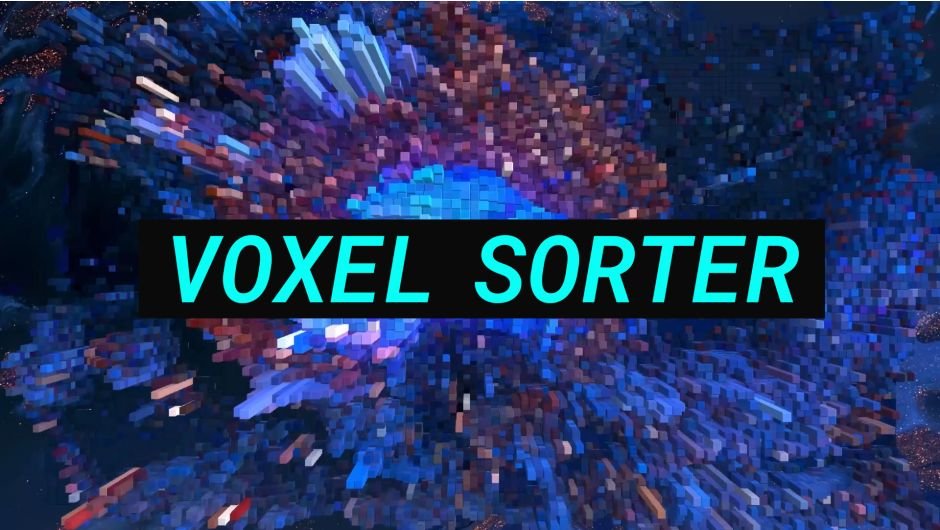
Voxel Sorter for After Effects
Voxel Sorter v1.15.2 for After Effects, Premiere Pro, DaVinci Resolve, and Nuke
The Ultimate 3D Voxel World and Pixel Sorting Plugin
Download Voxel Sorter v1.15.2 today. Consequently, you can instantly explode any flat footage into a field of 3D blocks that you can tilt, light, and pixel-sort in three dimensions. Because modern motion design and glitch art constantly demand unique, eye-catching visual treatments, having a dedicated voxel conversion tool is absolutely essential.
Nevertheless, manually modeling thousands of individual cubes or building complex 3D extrusion rigs is completely impractical. Fortunately, Voxel Sorter eliminates this bottleneck completely. Moreover, it uses a GPU-accelerated engine to turn brightness into depth and color into geometry instantly . In short, you can create stunning, cube-sculpted miniature worlds with unprecedented speed.
Intelligent Depth Mapping and Voxel Generation
The core of this plugin lies in its ability to interpret visual data as physical height. For instance, it can use the image luma (brightness) as depth, where brighter areas become taller peaks . Furthermore, if you need more precision, the built-in AI Generate Depth feature estimates scene depth directly inside the plugin without requiring external depth maps .
Additionally, you can load your own external depth layer for total control. Since the voxel grid size is adjustable from 32 to 512 blocks across the frame, you can create anything from chunky retro cubes to highly detailed miniature dioramas . Consequently, your flat footage transforms into a volumetric landscape with weight and shadow.
Comprehensive 3D Pixel Sorting and Shading
Professional glitch aesthetics demand more than just static blocks. Therefore, Voxel Sorter includes a powerful 3D sorting engine. For example, you can drag the sort axis through your voxels, causing colors to migrate up, down, or front to back, leaving behind geometric streaks that look like a corrupted file .
Furthermore, the plugin offers extensive shading controls to make your voxel world look believable. Additionally, you can adjust bevels and roundness, add specular highlights, and enable ambient occlusion to darken the creases between blocks . Since every parameter is fully keyframable, you can animate the sorting and lighting dynamically. Thus, your visuals will have the premium, dimensional polish of a professional 3D render.
Real-Time GPU Acceleration and Multi-Host Support
Creative exploration demands immediate visual feedback. Accordingly, Voxel Sorter is fully GPU-accelerated, utilizing Metal on Mac and DirectX 12 or Vulkan on Windows for smooth performance . For instance, you can orbit the voxel world with your After Effects camera and preview the results in real-time.
Furthermore, the plugin is available across a wide range of host applications, including After Effects, Premiere Pro, DaVinci Resolve, and Nuke . Additionally, the Pro version adds Depth of Field and Motion Blur to enhance the miniature effect . Since the tool is optimized for modern hardware, you can iterate rapidly without waiting for renders. Consequently, you can achieve polished, cinematic results in a fraction of the time.
Perfect for Motion Designers and VFX Artists
This plugin is particularly well-suited for motion designers creating edgy music videos and title sequences. Similarly, VFX artists will appreciate the ability to generate unique glitch transitions and stylized visual effects. Additionally, content creators looking to add a distinctive, geometric aesthetic to their projects will find Voxel Sorter invaluable. Ultimately, Voxel Sorter v1.15.2 accelerates your entire post-production pipeline.
System Requirements and Compatibility
Voxel Sorter v1.15.2 supports After Effects 2022 through 2027, Premiere Pro 2022 through 2026, DaVinci Resolve 18 through 21, and Nuke/NukeX 13.2 through 17.0 . It works on both Windows and macOS, though Mac users require Apple Silicon (M1 or later) . You will need a standard workstation with at least 8GB of RAM and a compatible GPU.
Installation and Usage Guide
To install, first download the installer from your library. Next, close your host application if it is running. Then, run the installer, which will download the necessary AI depth models and GPU libraries . After that, restart your application and locate Voxel Sorter in the Pixel Sorter Studio effect category.
Finally, apply the effect to your footage, select your depth source, adjust the voxel size, and begin sorting. To activate your license, click Register at the top of the effect in Effect Controls and paste your key . Thus, your 3D voxel workflow will be ready instantly.
What is Included Inside?
The pack contains the complete Voxel Sorter v1.15.2 plugin for all supported hosts. Furthermore, it includes the AI depth generation engine, the 3D pixel sorting system, and comprehensive shading controls . Additionally, you receive GPU acceleration and full keyframe support. Ultimately, you receive everything needed for professional voxel and glitch effects.
Final Thoughts on the Plugin
Effortless voxel generation evokes profound creative freedom. Therefore, this plugin provides the ultimate foundation for your dimensional glitch workflows. You can transform any footage into a cube-sculpted world with unprecedented speed and precision. Consequently, your creative vision becomes a stunning reality.
Voxel Sorter turns your footage into a tiny voxel world you can tilt, light, and pixel‑sort in 3D.
Turn any clip into a Voxel World!
Voxel Sorter explodes your footage into a field of 3D blocks, each one carved from the pixels of your source. Brightness becomes depth, colour becomes geometry, and what was flat suddenly has weight and shadow. Move the camera, tilt the world, watch the same shot you’ve seen a hundred times become a cube‑sculpted miniature you can almost pick up.
It’s pixel sorting, but in three dimensions!
Drag the sort axis through your voxels and the whole structure ripples — colours migrating up, down, or back to front, leaving behind streaks of geometry that feel half painted, half built. The look lives somewhere between Minecraft, blueprint, and broken JPEG.


real human ✓made and supported
by a real human.I’ve been building plugins for VFX artists since 2015. This is my full-time job: I write the code, ship updates every week, and answer every support ticket myself.Read the story ›
AI Depth Generation
Generate the depth estimation from within the plugin instead of relying on an external plugin
Motion Blur
Blend-in with the comp’s camera movement
Depth of Field
Add depth blur with lots of settings
Elevate your motion graphics workflow with premium collection of After Effects plugins. Whether you are a seasoned professional or just starting your VFX journey, powerful tools designed to streamline complex tasks, unlock creative possibilities, and save you hours of rendering time. From stunning glitch effects and seamless transitions to advanced 3D extrusion and text animation tools, each plugin in our library is rigorously tested for compatibility with the latest versions of Adobe after Effects. Enhance your video production value today and download industry-leading plugins that help you create breathtaking visuals without the technical headaches. Browse our full range and find the perfect extension to supercharge your editing suite now.
➡️ ➡️ For more after effects Plugins 😀 😀
➡️ ➡️ System requirements AE
Reviews
There are no reviews yet.