
VoxFerry for After Effects
VoxFerry V0.7.1 for Premiere Pro
The Ultimate Automated Voice Generation and Narration Tool for Premiere Pro
Download VoxFerry V0.7.1 today. Consequently, you can instantly generate high-quality AI voiceovers and sync them directly to your timeline without ever leaving Premiere Pro. Because modern content creation demands rapid narration, audiobook production, and localized voice tracks, having an integrated text-to-speech tool is absolutely essential.
Nevertheless, the traditional workflow requires exporting scripts, using external AI voice websites, downloading files, and importing them back into your project. Fortunately, VoxFerry eliminates this bottleneck completely. Moreover, it brings the power of advanced AI voice models directly into your editing environment. In short, you can turn written scripts into professional voiceovers in seconds.
Seamless AI Voice Integration and Generation
The core of this extension lies in its direct connection to premium AI voice engines. For instance, you can paste your script directly into the VoxFerry panel and select from hundreds of hyper-realistic voices. Furthermore, the tool automatically routes the generated audio file straight to your Premiere Pro project bin and timeline.
Additionally, you can generate multiple takes and variations instantly to find the perfect tone. Since the entire process happens natively inside your editor, you avoid the friction of external software. Consequently, your workflow remains fast, fluid, and highly productive.
Comprehensive Timing and Placement Controls
Professional editing demands precise synchronization between audio and visuals. Therefore, VoxFerry includes robust placement tools. For example, you can automatically place generated voiceovers at the playhead position. Furthermore, you can generate entire sequences of dialogue and distribute them evenly across specific clips.
Additionally, the tool automatically formats the audio clips with your preferred track targeting and labels. Since the placement is fully automated, you avoid manually dragging and dropping dozens of individual audio files. Thus, your timeline stays organized and perfectly timed.
Real-Time Performance and Local Processing
Creative exploration requires fast, responsive tools. Accordingly, VoxFerry is highly optimized for modern production workflows. For instance, the extension supports rapid generation speeds so you can preview voiceovers in real-time.
Furthermore, the tool handles API connections securely, keeping your project data safe. Additionally, it includes an intuitive interface that docks perfectly into your workspace. Since the plugin is lightweight, it never slows down your editing software. Consequently, you can iterate rapidly and meet tight deadlines effortlessly.
Perfect for Content Creators, Documentary Editors, and Marketers
This extension is particularly well-suited for content creators producing YouTube videos and social media content. Similarly, documentary editors will appreciate the ability to generate scratch tracks and temporary narration. Additionally, marketing teams and corporate editors will find the rapid localization and voice generation invaluable. Ultimately, VoxFerry V0.7.1 accelerates your entire post-production pipeline.
System Requirements and Compatibility
VoxFerry V0.7.1 supports Premiere Pro versions 2024, 2025, and 2026. It works on both Windows and macOS operating systems. The extension requires an active internet connection to access the AI generation services. You will need a standard workstation with at least 8GB of RAM.
Installation and Usage Guide
To install, first download the extension files from your library. Next, close Adobe Premiere Pro if it is running. Then, install the extension following the standard aescripts + aeplugins process. After that, launch Premiere Pro and navigate to Window > Extensions > VoxFerry.
Finally, paste your script into the text box, select your desired AI voice, and click Generate. Thus, your automated voiceover workflow will be ready instantly.
What is Included Inside?
The pack contains the complete VoxFerry V0.7.1 extension for Premiere Pro. Furthermore, it includes the seamless AI voice generation engine and comprehensive timing and placement controls. Additionally, you receive real-time performance optimization and native integration with the Premiere Pro timeline. Ultimately, you receive everything needed for professional AI narration.
Final Thoughts on the Extension
Effortless voice generation evokes profound creative freedom. Therefore, this extension provides the ultimate foundation for your editorial workflows. You can create professional narration with unprecedented speed and simplicity. Consequently, your storytelling vision becomes a stunning reality.
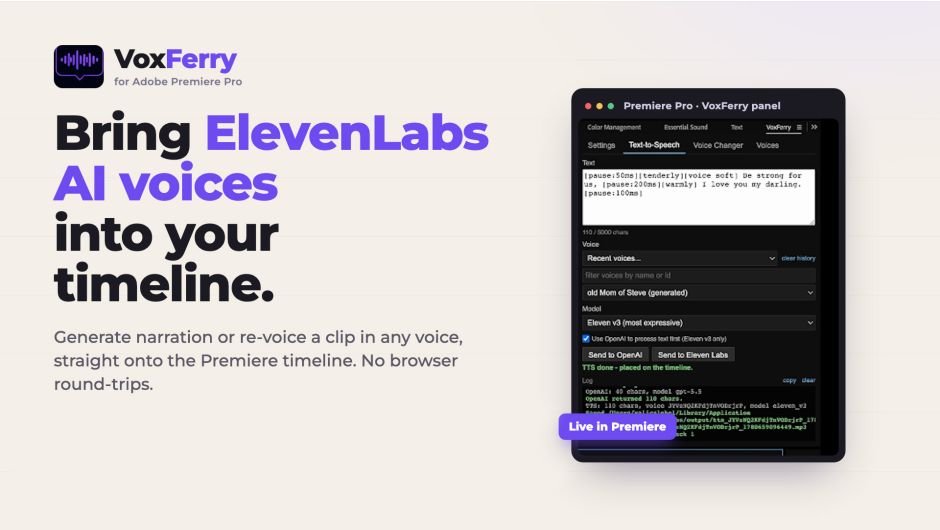
ElevenLabs text-to-speech and voice changing inside Premiere Pro, with an AI script director for expressive v3 narration. No exporting, no re-importing.
VoxFerry brings ElevenLabs AI voices into the Premiere Pro timeline.
An AI voice director for ElevenLabs v3.
VoxFerry can run your text through OpenAI before it is spoken, using a built-in voice-director prompt that rewrites flat text into an expressive, tagged ElevenLabs v3 script: delivery, tone, pacing, and pauses. You review the result in the panel, edit it if you want, then send it to ElevenLabs. The prompt is fully editable, you choose the OpenAI model (default GPT-5.5), and you can turn on reasoning for tougher passages. This step is optional and only used when you opt in.

What you can do
– Text-to-Speech: type or paste text, pick a voice and model (Eleven v3, Multilingual v2, Flash and Turbo v2.5), generate, and the MP3 is imported into a dedicated bin and optionally dropped at the playhead.
– Voice Changer (speech-to-speech): select a timeline clip, convert its audio to any voice, and the new take is placed on a free audio track aligned to the original while the original is muted (reversible, nothing is deleted).
– Voice Library: search and preview ElevenLabs shared voices and your own voices, filter by name or id, and add voices to your account.
– AI script director (optional): OpenAI pre-processing for richer v3 performances, with an editable prompt, a model picker, and a thinking toggle.
– Batch: queue several selected clips and process them one at a time with a live status log.
– Timeline-native: audio imports into its own bin and places precisely, so the rest of your edit is never disturbed.

Compatibility
– Adobe Premiere Pro 2026 or newer.
– Windows and macOS, one signed .zxp.
Requirements and privacy
– Bring your own ElevenLabs account and API key. ElevenLabs usage is billed by ElevenLabs at your plan’s rates.
– The AI script director is optional and needs your own OpenAI API key.
– Your keys are stored locally on your machine. VoxFerry talks directly to ElevenLabs and OpenAI; there is no third-party server in between.
Elevate your motion graphics workflow with premium collection of After Effects plugins. Whether you are a seasoned professional or just starting your VFX journey, powerful tools designed to streamline complex tasks, unlock creative possibilities, and save you hours of rendering time. From stunning glitch effects and seamless transitions to advanced 3D extrusion and text animation tools, each plugin in our library is rigorously tested for compatibility with the latest versions of Adobe after Effects. Enhance your video production value today and download industry-leading plugins that help you create breathtaking visuals without the technical headaches. Browse our full range and find the perfect extension to supercharge your editing suite now.
➡️ ➡️ For more after effects Plugins 😀 😀
➡️ ➡️ System requirements AE
Reviews
There are no reviews yet.