
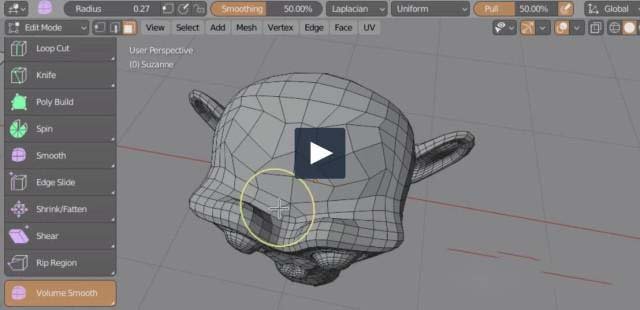
vps smoothing for Blender
vps smoothing addon
VPS Smoothing v2.52 for Blender – Advanced Mesh Smoothing & Surface Refinement Tool
Version : V2.53
File Size: 1 MB
Download VPS Smoothing v2.52 for Blender on Windows, Mac, and Linux, a powerful mesh smoothing add-on that provides professional-grade surface refinement and noise reduction for 3D models. Perfect for sculptors, 3D scanning professionals, and character artists who need clean, smooth surfaces without losing important detail .
Key Features of VPS Smoothing v2.52:
- Intelligent Smoothing: Removes surface noise while preserving sharp edges and fine details
- Adaptive Smoothing: Varies smoothing amount based on surface curvature
- Multi-Resolution Support: Apply smoothing at specific subdivision levels
- Mesh Cleanup: Remove bumps, pits, and surface artifacts
- Sculpt-Ready: Prepares meshes for detailed sculpting
- Scan Cleanup: Smooths noise from 3D scanned data
- Batch Processing: Apply smoothing to multiple objects
- Real-Time Preview: See smoothing results instantly
- v2.52 Updates: Enhanced algorithms, improved detail preservation, and compatibility with Blender 4.0+
Perfect For:
- Sculptors refining high-poly sculpts
- 3D scanning professionals cleaning captured data
- Character artists preparing models for rendering
- Game developers optimizing asset appearance
- Anyone needing professional mesh smoothing
System Requirements:
- Blender 3.6, 4.0, 4.1, 4.2, 4.3
- Windows 10/11 (64-bit), macOS, or Linux
- 4GB RAM minimum (8GB+ recommended)
- 10MB available disk space
Installation:
- Download the add-on zip file
- In Blender, go to Edit > Preferences > Add-ons
- Click “Install” and select the downloaded zip file
- Enable the add-on by checking the box next to “VPS Smoothing”
Note: VPS Smoothing provides professional mesh smoothing capabilities for Blender, removing surface noise while preserving important details . The adaptive smoothing and multi-resolution support make it essential for sculptors, 3D scanning professionals, and character artists . Version 2.52 includes full compatibility with Blender 4.0 and above . Designed for Blender 3.6 and above . Perfect for surface refinement . Essential for any smoothing workflow .
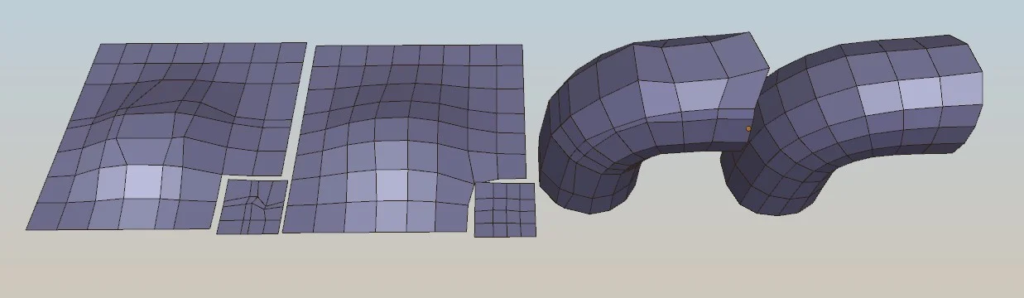
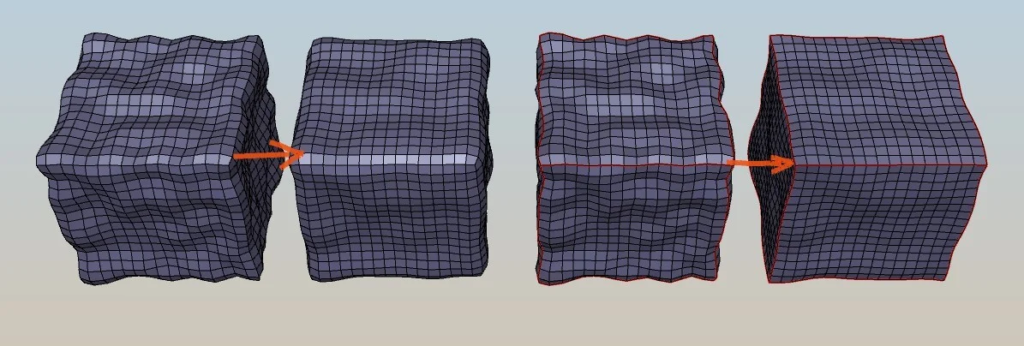
Addon for Blender 3.6 or 4.0.1 and up – smoothing mesh surfaces without volume loss. Since ver 2.3 update there is also ‘Volume smooth brush’ tool (has geometry sliding option) available in edit mode.
Video guide – bit old – there was no smooth brush yet.
Volume Preserving Smoothing considers sharp edges as guiding rails for vertices to move along, allowing the preservation of the primary forms of the smoothed object. This feature helps maintain the overall shape and structure of the smoothed object.
To access the smoothing operator (works on whole mesh or selection): open mesh context menu with W key in mesh edit mode, then select Mesh Smoothing visible at the very bottom, and pick mode:
- Inflate smoothing – good for round surfaces
- Laplacian HC smoothing – fast but sometimes give artifacts
- Volume smoothing – slower but best quality
To use smooth brush: open left tools sidebar (T – key in 3D View), enable ‘Volume smooth tool’ icon – usually at the very bottom of tools list.
Features:
- smooth mesh while maintaining main object shape (operator and brush)
- border mesh vertices will slide along border edges, this prevents shrinking of mesh outline
- smooth brush support pulling/sliding of geometry along surface of mesh
- X axis symmetry is supported
- works with shape-keys
- you have ability to define sliding rail edges (edges marked as sharp) – they constrain sliding of geometry
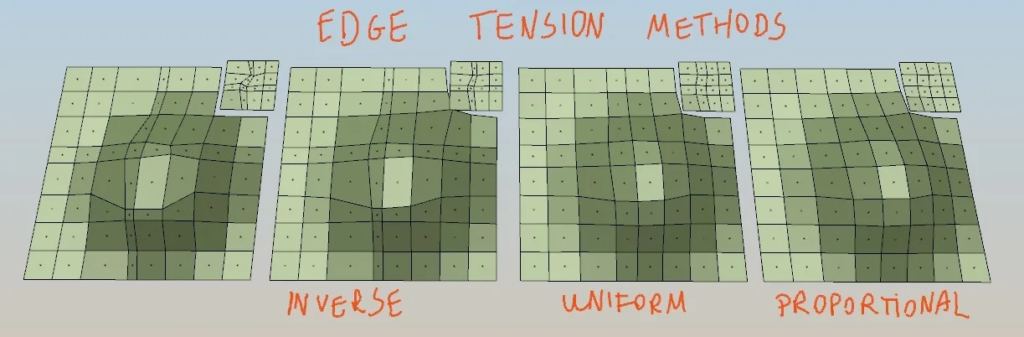
- three edge tension methods (Uniform, Proportional to edge length, Inverse to edge length)
- optimized with NUMPY
To make edge into rail edge – just mark edge loop as sharp. Now verts belonging to this edge, will move only along edge.
Update 1.1 + 1.2 + 1.3:
* improved speed around 60%, plus bug fix.
Update 1.4:
- you can increase iterations amount above 20 (by manually entering bigger value)
Update 2.0 (08.12.2018):
- Added support for blender 2.8 in version 2.0 of addon.
Update 2.1 (blender 2.8) (14.03.2019):
- Support for symmetrical smoothing when using ‘mirror’ option in mesh edit mode.
- bugfixes for latest daily blender builds
Update 2.3 (blender 2.8) (31.12.2019):
- fix verts on symmetry not being smoothed correctly
- added smooth brush for mesh edit mode
Update 2.4 (blender 2.8) (03.01.2020):
- better algorithm for brush size adjusting from F key
- fix bad smoothing radius influence when object has no scale applied
Update 2.5 (blender 2.93) (28.01.2020):
- added option for pulling/sliding geometry
- exposed more parameters in smooth tool – backface mask, locking border, smoothing face proportions
Update 2.5.1 (02.07.2021)
- tweak behavior of freeze selection border – in brush mode
Update 2.5.2 (17.01.2022)
- nicer brush outline for smooth tool
- fixed smoothing behavior when brush moved outside of mesh
- fixed smooth brush not working in some cases
Update 2.5.3 (16.05.2022)
- fix brush outline for scaled objects
- added auto-updater in add-on preferences
Last update 2.6.0 (28.07.2023) – For Blender 3.6 and up
- added ability to work on very small objects (minimum brush size is now linked to 0.001 of object size),
- Moved from old bgl module to gpu module (from now on only blender 3.6 and up will be supported)
Last update 2.7.0 ( 22.10.2023 – For Blender 3.6, 4.x)
- Added support for Blender 4.0,
- Moved from old bgl module to gpu module (from now on only blender 3.6 and up will be supported)
Last update 2.8.0 ( 26.11.2023 – For Blender 3.6, 4.x)
- Smooth Operators now support masking the effect by Vertex Group (see F9 Vertex Mask property)
- Adjusting Smooth brush size with F and strength with Shift+F wont move brush outline anymore (more in line with Blender brush behavior),
- Fix brush strength number not being visible in UI when adjusting it,
Last update 2.9.0 ( 16.10.2024 – For Blender 3.6, 4.x)
- Pull strength can be adjusted with Ctrl+Shift+F key,
Supercharge your 3D creation workflow with premium selection of Blender Add-ons. Whether you are modeling intricate characters, sculpting realistic environments, or animating cinematic sequences, the right add-on can transform how you work inside Blender. Our curated collection includes powerful tools for UV unwrapping, procedural texture generation, rigging automation, rendering optimization, and more—each rigorously tested for compatibility with the latest Blender versions. Eliminate tedious manual processes and unlock advanced functionality that lets you focus on what matters most: bringing your creative vision to life. Explore our full range of professional Blender plugins today and take your 3D projects to the next level.
➡️ ➡️ For more Blender Plugins 😀 😀
Reviews
There are no reviews yet.