
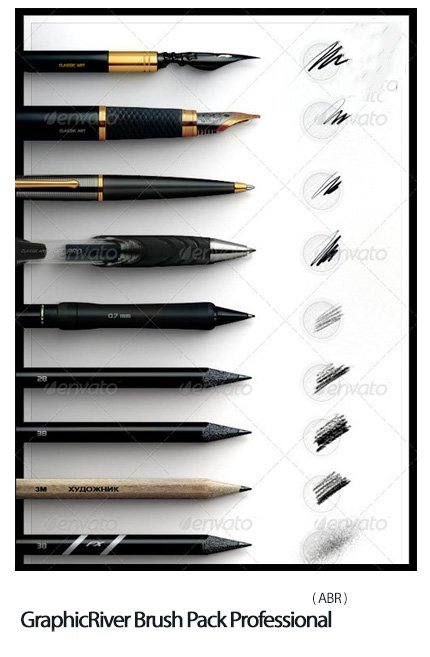
GraphicRiver Brush Pack Professional
Photoshop Brushes Various fonts | 51.0 MB | With preview | ABR format
In this collection, you can see various examples of Photoshop brushes , which have been placed on the site in ABR format for download.
GraphicRiver Brush Pack Professional

CLASSIC ART BRUSH PACK – REALISTIC ART TOOLS FOR PS (real stroke simulation)
Yes… Its true now: We had combined all our expierience of professional artists and digital technologies (you probably know legendary prevous brush packs) to let you draw directly in Photoshop CS Series without using additional art software.
Everybody dreamed about it. But now its all availble in your creative hands.
DESCRIPTION:
Pens: Unlike simple PS brushes we used Double sampled technology in 16 bit color deph. It uses unique autorized HRDR samples and allow very smooth inter-sampling fill and also auto-smoothing stroke curvature. This effect was named “Liquid Ink” and let you to almost feel ink flow with your hand when pressing stylus – Just try to make some signature.
Pencils: There were created nice pencils with very pleasent pressure reaction when placing tone strokes. Also two universal lead simulators for charcoal/pastel/chalk simulations Just use white color for chalk, black for coal, and any pastel colors for pastel. There also 2 pencil FX tone Brushes wich are really fantastic tool.
Brushes: You must just try. No words.
Smudge: Fantastic “Water Dissolve” smudge brush instrument allow you to make revolutional in digital art local dissolve paint effect.
As useful bonus: There also noisy textured pencil eraser added for more realistic work!
Features of this art pack:
First of all its not just extremaly realistic look for strokes, but also maximum possible comfort and intuitive hand adaptaion like you feel with real qualitive art tools. It guaranteed that in a little pencil skilful hands your drawings will identical with natural scanned.
You’ll love simplicity and effectiveness, so that You’ll include this brush pack in your permanent collection because you can not do anything like that with any other brushes as I did myself.
Still wonder Why this brush pack collection? First of all, this brushes were not designed for sale and have been created for personal use and then for adobe perspective PS CS versions. Unfortunately for adobe, they asked for education in their country before talking about co-work. So the materials have not been demonstrated and technology was simplified and redesigned into brush pack *.ABR using current technology. You can enjoy this Brush Pack Vol. I Light’n’Flare for a funny price against author’s original price 400 EUR , and no need to wait new version of PS!
The Brush tool allows you to paint on any layer, much like a real paintbrush.
It’s easy to use the Brush tool to paint in your document. Simply Import The Brushes, locate and select the Brush tool from the Tools panel, then click and drag in the document window to paint. You can also press the B key on your keyboard to select the Brush tool at any time.
Brush Size: If you want to make the brush larger or smaller, click the Brush Picker drop-down arrow in the Control panel, then adjust the Size slider. You can also press the bracket keys [ ] to quickly increase or decrease the brush size at any time.
Hardness: If you want to make the edges of the brush harder or softer, you can adjust the hardness from the same drop-down menu. A harder brush will have clear, defined edges, whereas a softer brush will have blurry, less-defined edges. For most situations, we recommend setting the hardness to 50% or less because it will help to make individual brush strokes less obvious.
Brush Tip: If you want to create a unique effect, there are different brush tips to choose from in the same drop-down menu. Some of these are designed to mimic real-life drawing tools like pens and markers, while others are simpler.
Opacity: By default, the opacity of your brush is set to 100%, meaning the brush will use the highest intensity. However, you can reduce the opacity of your brush to make it less intense.
➡️ ➡️ For More Brushes Products 😀 😀
System Requirement For Photoshop CC


Reviews
There are no reviews yet.