
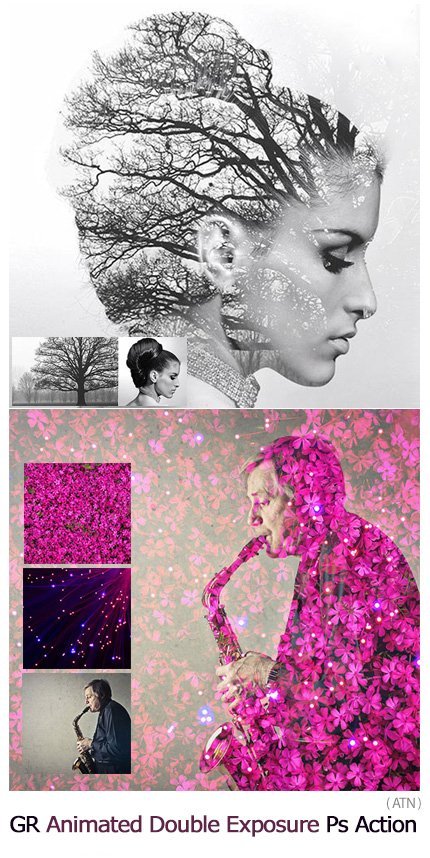
Animated Double Exposure Photoshop Action
Photoshop action to make animated double exposure images with video tutorial | 0.71 MB | ATN format
In this collection, you can see another example of the effect of images in the form of action and with the title of making animated double exposure images along with a video tutorial , which is available for download in ATN format.
Animated Double Exposure Photoshop Action
The action comes with 30 scenes ranging from nature landscapes to cities.
The action can also generate a standard double exposure effect by combining two images of your choice.
The resulting document contains multiple adjustment layers with mask in order to give full control of the effect – adjusting both blending layers, revealing or hiding more of them, adding light etc.

Gif Animated Double Exposure
Best and easy way to create amazing animation on your photo. You can combine multiple photos by playing action for each additional image. Super easy to use. This action is very suitable for photos of portraits, animals, birds, architecture, products, vehicles, furniture, food, lighting, fire, clouds, flowers, sky, nature etc. Color effect actions included. Save hours of work with this action. Action delivers you a well-organized and structured file. Action perfectly work on Mac and PC.
Watch detailed video tutorial for this action HERE
The COMPATIBLE versions of Photoshop is CS6, CC, CC 2014, CC 2015, CC 2017, CC 2018, CC 2019, CC 2020+ !
VIDEO TUTORIAL
MULTILANGUAGE
Language is not a barrier. This action successfully optimized to work with all language versions of Photoshop.
ACTION INCLUDE
- main .atn file
- help file
- Color options
- fully editable graphic elements
- well organized folders
How to configure Photoshop to work with actions.
- Use the RGB Mode and 8 Bits color. To check these settings, go to Image->Mode and check the “RGB color” and “8 Bits/Channel”.
- Use a photo with 72dpi or higher. If you are using a photo with less than 72dpi, the action will not function correctly. To fix this, go to Image->Image Size and increase the resolution value.
- Set the Opacity of brush to 100%. Set the Opacity of the brush to 100%. Select the “Brush Tool” and move the opacity slider to 100%.
A Photoshop action is an incredible feature tool that allows you to record a series of steps
To achieve remarkable effects, and then play the sequence back to apply those effects on any image.
Because these actions are reusable you can improve your workflow by chopping countless hours off your design process.
you can transform your images into polished works of art while saving a lot of time and money.
Designed to save you time in the editing process for actions that you do repeatedly and create lots more elements that can be edited manually.
Exclusively designed for graphic designers & photographers .
we’ve cut out the hard work for you by putting the best collection of excellent Premium Photoshop actions!
Photoshop actions are perfect for both beginners and advanced Photoshop users
➡️ ➡️ For More Actions Photoshop 😀 😀
System Requirement For Photoshop CC
How to Change Language Setting


Reviews
There are no reviews yet.