
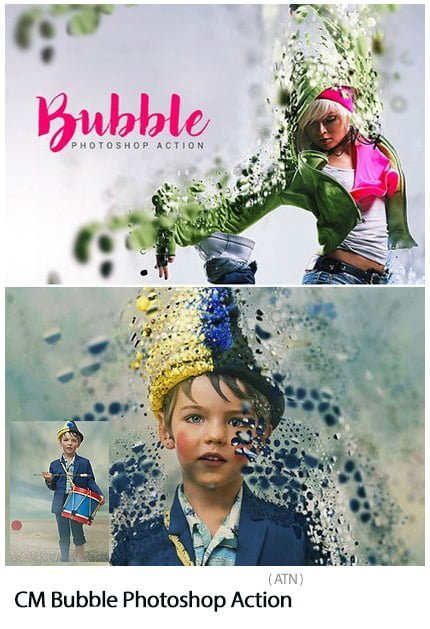
Bubble Photoshop Action Photoshop Action Create scattered bubble effects on images | 0.69 MB | ATN format
In this collection, you will see another example of the effect of images in the form of action and titled creating the effect of scattered bubbles on the images, which is in ATN format on the site for download.
Bubble Photoshop Action

Your photo is in RGB color mode
Your photo is in 8bit color mode
You are running the English version of Photoshop.
If you are experiencing errors, try resetting your Photoshop preferences. To do this, hold down Alt, Ctrl, and Shift keys (Mac: Command, Option, Shift) while starting up Photoshop. A dialog box will appear asking if you wish to delete the preferences/settings file.
Avoid using small resolution images. For the best results, use Photos between 1500px – 3000px high/wide. Chances of the action running into errors will increase the lower you go under 1000px high/wide. Photos with good color variation and contrast wil work best.
Avoid brushing onto mainly black areas on a photo. The effect is not very prominant when applied to mostly dark areas of a photo.
Remember that adjusting your photo resolution will determine how wide the parts spread out. If you run the action at 72DPI, then the parts will be quite close – if you run it at 300DPI, the parts will be spread much wider. Please refer to the video tutorial for a demonstration of this.
If you experience an ‘Out of Memory’ error during the action, go to the menu ‘Edit — Purge — All’ then press play again on the action to continue it. This can happen if you have insufficient memory installed on your computer. Photoshop can chew up lots of memory!
A Photoshop action is an incredible feature tool that allows you to record a series of steps
To achieve remarkable effects, and then play the sequence back to apply those effects on any image.
Because these actions are reusable you can improve your workflow by chopping countless hours off your design process.
you can transform your images into polished works of art while saving a lot of time and money.
Designed to save you time in the editing process for actions that you do repeatedly and create lots more elements that can be edited manually.
Exclusively designed for graphic designers & photographers .
we’ve cut out the hard work for you by putting the best collection of excellent Premium Photoshop actions!
➡️ ➡️ For More Actions Photoshop 😀 😀
System Requirement For Photoshop CC
How to Change Language Setting


Reviews
There are no reviews yet.