
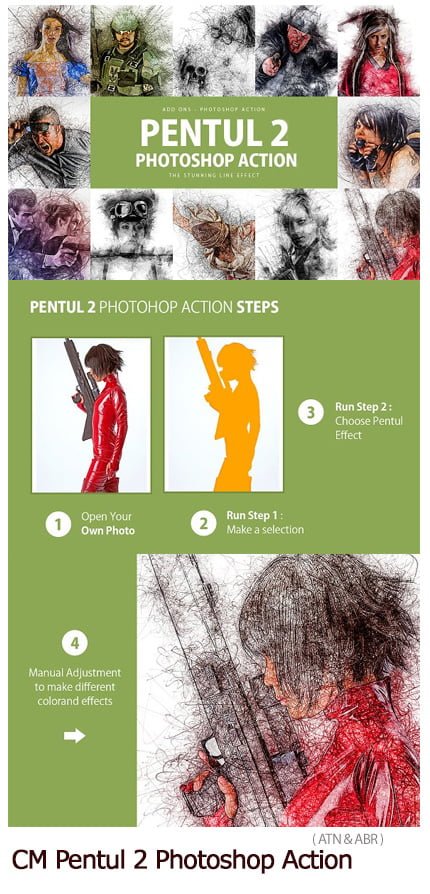
pentul 2 photoshop action
Photoshop action Convert images to line drawing with video tutorial | 6.31 MB | ATN & ABR format
In this collection, you can see another example of the effect of images in the form of action and with the title of converting images into watercolor art paintings along with video tutorials, which are available for download in ATN and ABR formats on the site.
pentul 2 photoshop action
Description
Create stunning effect to your photo instantly using Pentul 2 Photoshop Action. The action has lots more elements that can be edited manually. After this action finished you can set opacity of layer, set properties, duplicate, move etc.
Pentul 2 photoshop action created for all users like you. You can use this action for poster, profile, cover or printing maybe. I hopefully you like this one, if you do, don’t forget to rate and set to your favorite.
The all layers and folders are editable, it is non-destructive, support newest all photoshop version and all language.
Tutorial: https://youtu.be/OuCWm2Tvi3M
—
Note
– All Images in the preview are not included at the zip file.
– For the best results, it is recommended to use high resolution photos in the range of 2500px – 3500px. The optimal range is from 2000px – 3500px. The detail and clarity in the effects generated by the actions reduce the smaller of your photo.
—
Action Test
Each action is through tested across between 50 – 100 different photos to ensure there are no errors. In this case where you do experience an error. Contact me via email if you area still having troubles.
—
Organize
After each action has finished playing, it creates a well organised layer structure. Each layer and folder are named appropriately and colors coded to create a neat working environment for you.
*If you own multiple actions, have you thought about stacking the effects to build even more advanced designs?*.
**Tips how to combine the actions:**
– Run the first action on your photo.
– One you are happy with the design, save your image out.
– Now re-open your image and run another action!.
You can then use the second actions layer flexibility to further customise the design. You can follow this process and stack effects to build incredibly detailed designs with very little work.
- Include readme file (pdf file)
- Include pentul 2 brushes
- There is video link tutorial
- Well organised layer and folder
- Non-destructive layer and folder
- And many more…


https://youtu.be/OuCWm2Tvi3M
A Photoshop action is an incredible feature tool that allows you to record a series of steps
To achieve remarkable effects, and then play the sequence back to apply those effects on any image.
Because these actions are reusable you can improve your workflow by chopping countless hours off your design process.
you can transform your images into polished works of art while saving a lot of time and money.
Designed to save you time in the editing process for actions that you do repeatedly and create lots more elements that can be edited manually.
Exclusively designed for graphic designers & photographers .
we’ve cut out the hard work for you by putting the best collection of excellent Premium Photoshop actions!
Photoshop actions are perfect for both beginners and advanced Photoshop users
➡️ ➡️ For More Actions Photoshop 😀 😀
System Requirement For Photoshop CC
How to Change Language Setting


Reviews
There are no reviews yet.