
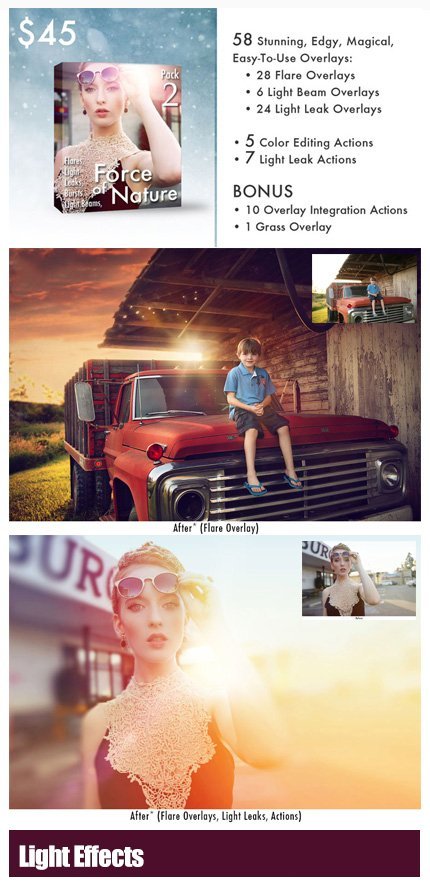
Jessica Drossin Force Of Nature Light Effects
17 clip art and Photoshop action to create red flowers effect on images | 34.3 MB | ATN & PNG & JPG format
This section includes 58 clip art and Photoshop action with various lighting effects, which are available for download in ATN, PNG and JPG formats.

Force of Nature: Light Effects is bold. Unpredictable. Unique. These overlays are chock full of drama, attitude, and artsy appeal, and will pump up even the simplest of images. Discover the magic of the rainbow spectrum, the playfulness of lens flares, and the unique aesthetic light leaks add. This pack is perfect for urban and vintage processing, teen sessions, edgy boudoir shoots, and anything else that might require a powerful punch of personality. Join me in recreating the fun of “artful accidents” as I harken back to the days of the Diana camera. Take the plunge. Discover the Force of Nature: Light Effects.


58 Overlays Total
• 28 flares total (11 rainbow, 17 others of various shapes and sizes). Lens flares offer, well, flare! Use these for a little extra touch of magic in your images.
• 6 light beams. Great for effects like rays streaming through clouds or windows.
• 24 light leaks. Light leaks add character to your images by giving the appearance of light seeping into either the sensor or physical film of a non-digital camera. These particular leaks show off some great colors and provide an array of options for shape, size, and style. Perfect for adding a little flare in vintage or urban editing!
• 1 bonus grass overlay. This overlay will save you time and add a soft, grassy foreground by just dragging it in. It’s transparent, so no extra editing required!
• 13 light effect actions to assist you in editing and add mood to your entire image.
• 8 overlay enhancement actions to help you get more specific with how your overlays appear.
• 2 light overlay enhancement actions specifically designed to help you get the effect you want with your flare, beam, and light leak overlays.
• 1 bonus editing action – “Pop Contrast” – to beef up the contrast in your image.
• Flare 1
• Flare 2
• Flare 3
• Flare 4
• Flare 5
• Flare 6
• Long Flare 1
• Long Flare 2
• Long Flare 3
• Long Flare 4
• Long Flare 5
• Long Flare 6
• Long Flare 7
• Long Flare 8
• Long Flare 9
• Long Flare 10
• Long Flare 11
• Long Flare 12
• Rainbow Flare 1
• Rainbow Flare 2
• Rainbow Flare 3
• Rainbow Flare 4
• Rainbow Flare 5
• Rainbow Flare 6
• Rainbow Flare 7
• Rainbow Flare 8
• Rainbow Flare 9
• Rainbow Flare 10
• Green Grass Bonus
• Dusty Rays
• Light Beam 1
• Light Beam 2
• Light Beam 3
• Light Beam 4
• Light Beam 5
• Dusty Light Leak 1
• Dusty Light Leak 2
• Dusty Light Leak 3
• Dusty Light Leak 4
• Dusty Light Leak 5
• Dusty Light Leak 6
• Light Leak 1
• Light Leak 2
• Light Leak 3
• Light Leak 4
• Light Leak 5
• Light Leak 6
• Light Leak 7
• Light Leak 8
• Light Leak 9
• Light Leak 10
• Light Leak 11
• Light Leak 12
• Light Leak 13
• Light Leak 14
• Light Leak 15
• Light Leak 16
• Light Leak 17
• Light Leak 18
Technical Details
As a former graphic designer and art director in charge of producing printed boxes, posters and advertisements for world-wide entertainment brands, I am extremely picky about resolution and detail.
• Bonus Actions will work for CS 2-6, for Adobe Creative Cloud, for PSE 11+ or PSE Versions 7-10 using the Actions Player mode (included in all Elements Products). (Many PSE 6 users have purchased and used these actions but I cannot offer technical support for PSE6 so purchase at your own risk.)
• The overlay files are a minimum of 5616 x 3744 pixels, or 18.7 x 12.4 at 300 dpi. I designed these overlay files to be used in Soft Light (primary usage), Overlay, Multiply and Screen Modes, but feel free to experiment with other blending modes.
• Overlay files are not actions. They are not installed. They are jpg files that you save on your hard drive, an external or a cloud server and access as needed.
• Cloud overlay jpgs are high-resolution, most at 5616 x 3744 pixels, or 18.7 x 12.4 at 300 dpi, although some are even larger to offer additional easy and options for placement.
• Bonus Actions will work for CS 2-6, for Adobe Creative Cloud, for PSE 11+ or PSE Versions 7-10 using the Actions Player mode (included in all Elements Products). (Many PSE 6 users have purchased and used these actions but I cannot offer technical support for PSE6 so purchase at your own risk.)
The Beautiful World Textures are the largest I’ve ever released to accommodate the ever-increasing dimensions in digital photography. The texture files are 5616 x 3744 pixels, or 18.7 x 12.4 at 300 dpi. I designed these texture files to be used in Soft Light (primary usage), Overlay, Multiply and Screen Modes, but feel free to experiment with other blending modes.
• Texture files are not actions. They are not installed. They are jpg files that you save on your hard drive, an external or a cloud server and access as needed.
• Bonus Actions will work for CS 2-6, for Adobe Creative Cloud, for PSE 11+ or PSE Versions 7-10 using the Actions Player mode (included in all Elements Products). (Many PSE 6 users have purchased and used these actions but I cannot offer technical support for PSE6 so purchase at your own risk.)
• Overlay files work with all versions of Elements, Photoshop, and GIMP (a free editing program, click here to check it out). This product is not compatible with Lightroom.
• The Bonus Actions will work ONLY in CS2 and higher, including Creative Cloud, and PSE 7 and higher. (Many PSE 6 users have purchased and used these actions but I cannot offer technical support for PSE6 so purchase at your own risk.)
• All overlay files are high-resolution jpegs sized at 40 x 60 inches at 72 dpi. This translates to 14.4 x 9.6 inches at 300 dpi or 4320 x 2880 pixels. As I former graphic designer and art director in charge of producing printed boxes and advertisements, I am extremely picky about resolution and detail. I personally have used these textures to print on large (40 x 60″) canvas with no issues with dpi resolution.
• Payment is required via Paypal or a credit card. Once your payment clears, you will receive an email with a link where you can download your textures. Due to the nature of this digital product, all sales are final.
• The files come compressed in .zip format and must be unzipped to work. There are many free unzip programs for both Mac & Windows that will allow you to expand the files once they’ve been downloaded.
• Overlay files work with all versions of Elements, Photoshop, and GIMP (a free editing program, click here to check it out). This product is not compatible with Lightroom.
• The Bonus Actions will work for CS 2-6, for Adobe Creative Cloud, for PSE 11+ or PSE Versions 7-10 using the Actions Player mode (included in all Elements Products). (Many PSE 6 users have purchased and used these actions but I cannot offer technical support for PSE6 so purchase at your own risk.)
• All overlay files are high-resolution 300 dpi jpegs. Some may even be larger than your canvas size — this is to provide you with additional editing options for moving the clouds around to best fit an image without having to try to rez the clouds up, which can create printing issues.
Texture files work with all versions of Elements, Photoshop, and GIMP (a free editing program, click here to check it out). This product is not compatible with Lightroom.
• The PDF tutorial included with the textures only specifically addresses Photoshop users.
• For tutorials demonstrating Elements, GIMP and Photoshop, please see my Video Tutorials section on this website.
• All texture files are high-resolution jpegs sized at a minimum of 40 x 60 inches at 72 dpi. This translates to 14.4 x 9.6 inches at 300 dpi or 4320 x 2880 pixels. I personally have used these textures to print on large (40 x 60″) canvas with no issues with dpi resolution.You need not worry about any print quality issues on your photos.
None of my Actions, Textures or Overlays are compatible with Lightroom. Sorry.
By purchasing or acquiring this product (contest winner, product tester, etc), you must agree to abide by the terms of the End User License Agreement / Terms of Use.
Here are the simple rules for using my overlays and actions:
1) These textures, actions and overlays are licensed to one user only for their personal and/or professional use. I work hard to make them pretty inexpensive to discourage “sharing”. Each download comes with a unique watermark. Please be respectful and do not share with others. Should your unique watermark appear on a piracy site, I reserve the right to seek financial damages for any/all illegal downloads.
2) These textures, actions and overlays may not be re-sold, re-purposed, re-used, or redistributed in any way whatsoever without expressed written permission of Jessica Drossin. You may not use my textures to make “new” textures, actions, or overlays, should you do this, I will seek damages. It also a violation of my copyright and this license to use my textures, overlays, actions, etc., in anyway to re-create items such as textures, frames, vignettes, or brushes for redistribution or resale. Any repurposing or redistribution is illegal and is subject to prosecution.
3) You must use these textures, actions and overlays integrated with your own artwork and photography — ie. do not post them as they currently appear to Flickr, etc., unintegrated with your art as this would make them easy to steal. You may use them in client work, but may not post or redistribute them “as is” on your blog, in your mentoring class, etc.
4) These textures, actions and overlays are tools to be used at the artist’s discretion. The artist is the final decision-maker as every original image is different and will respond differently to each tool. Jessica Drossin Photography Inc. accepts no liability that may arise due to a user’s choice in how they have decided to edit their photo.
➡️ ➡️ For More Cliparts Collection 😀 😀
Illustrator System Requirement
System Requirement For Photoshop CC


Reviews
There are no reviews yet.